
Lecture 17: Introduction to natural language processing
UBC 2025-26
Imports
import os
import re
import string
import sys
import time

sys.path.append(os.path.join(os.path.abspath(".."), "code"))

from plotting_functions_unsup import *

import IPython
import numpy as np
import numpy.random as npr
import pandas as pd
from comat import CooccurrenceMatrix
from nltk.tokenize import sent_tokenize, word_tokenize
from preprocessing import MyPreprocessor
from sklearn.feature_extraction.text import CountVectorizer
from sklearn.linear_model import LogisticRegression
from sklearn.pipeline import make_pipeline

DATA_DIR = os.path.join(os.path.abspath(".."), "data/")
import nltk
nltk.download('stopwords')
[nltk_data] Downloading package stopwords to
[nltk_data] /Users/kvarada/nltk_data...
[nltk_data] Package stopwords is already up-to-date!
TrueLearning objectives
By the end of this lecture, you will be able to:
Differentiate between common similarity metrics, including Euclidean distance, dot product similarity, and cosine similarity.
Explain what Natural Language Processing (NLP) is and identify common applications.
Describe the idea behind topic modeling and apply it to uncover hidden structure and meaning in text data.
Distinguish between topic modeling and clustering in terms of goals and outputs.
Describe key text representations, from bag-of-words to word and sentence embeddings, and explain why richer representations are needed.
Use word embeddings to explore similarities and analogies between words.
Explain the difference between word embeddings and sentence embeddings and when each is useful.
Interpret similarities between words, sentences, or documents using cosine similarity.
Explain what a language model is and how it predicts or generates text.
Summarize the main ideas behind large language models (LLMs) and their role in modern NLP.
Recognize potential biases and ethical concerns when using pretrained language models.
What is Natural Language Processing (NLP)?
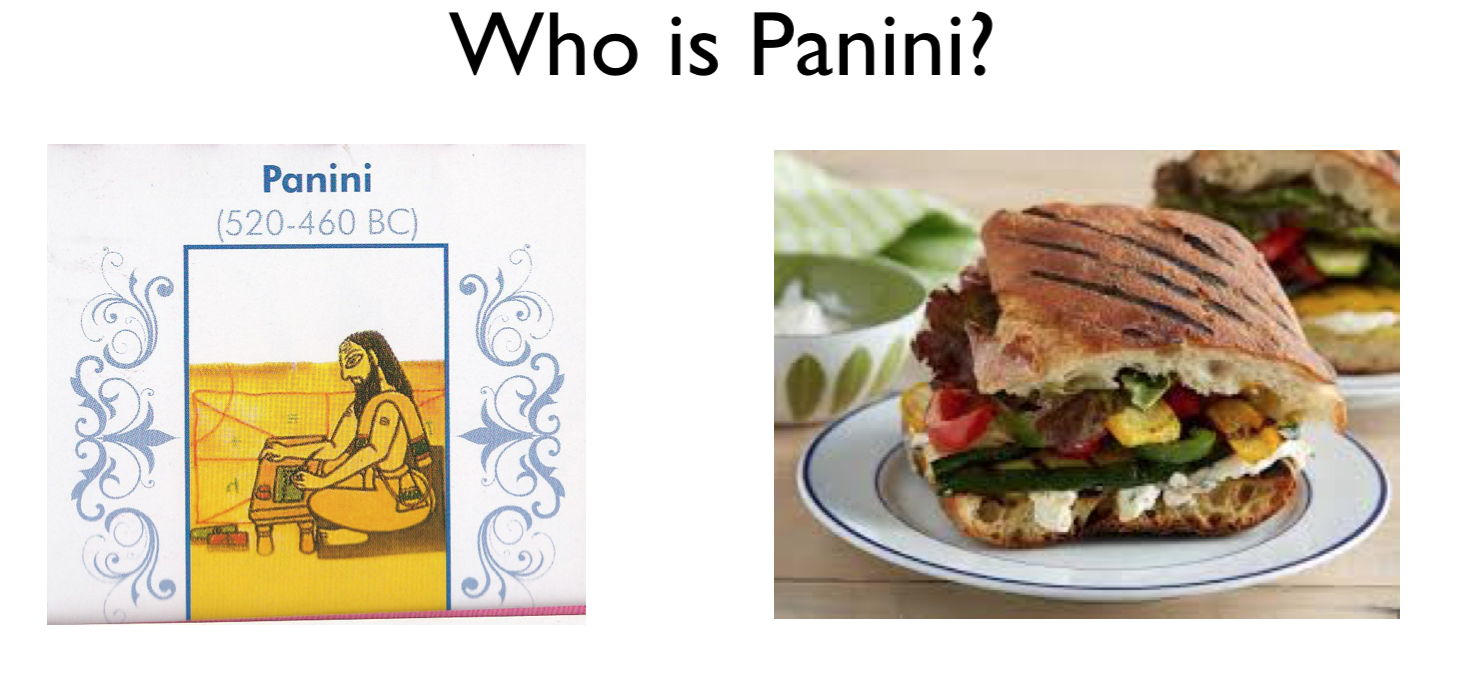
What should a search engine return when asked the following question?
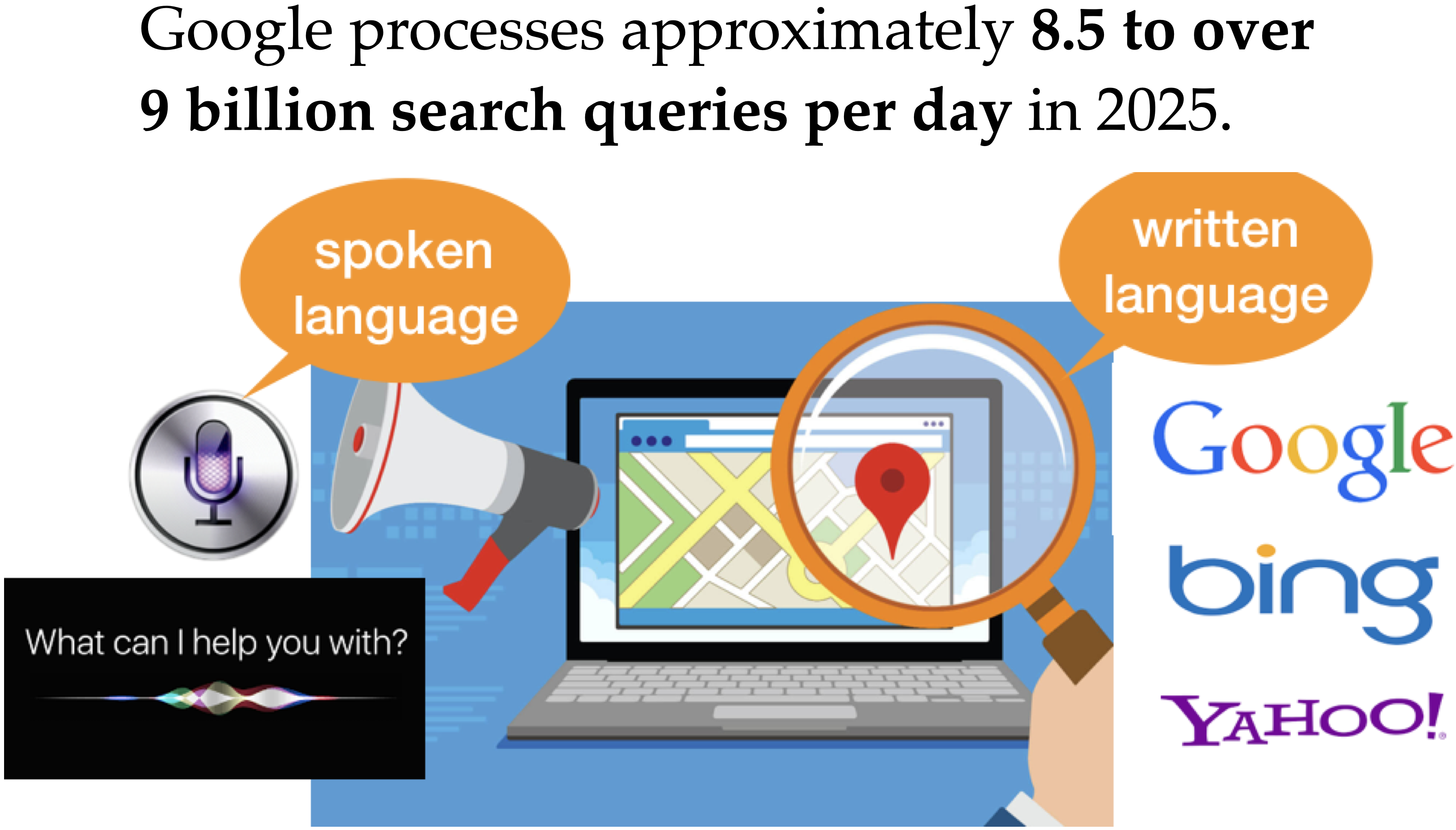
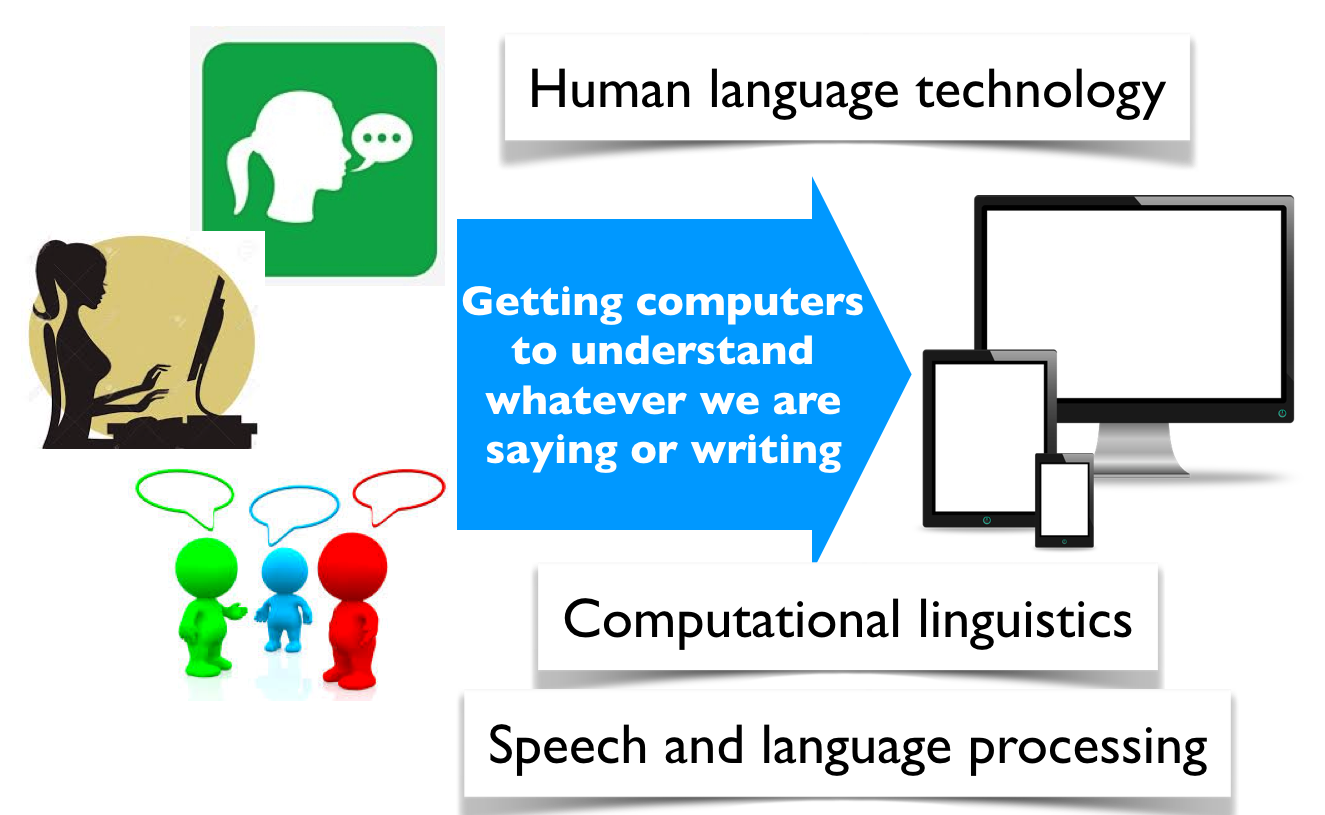
Natural Language Processing (NLP) is a branch of machine learning focused on enabling computers to understand, interpret, and generate human language.
Everyday NLP applications
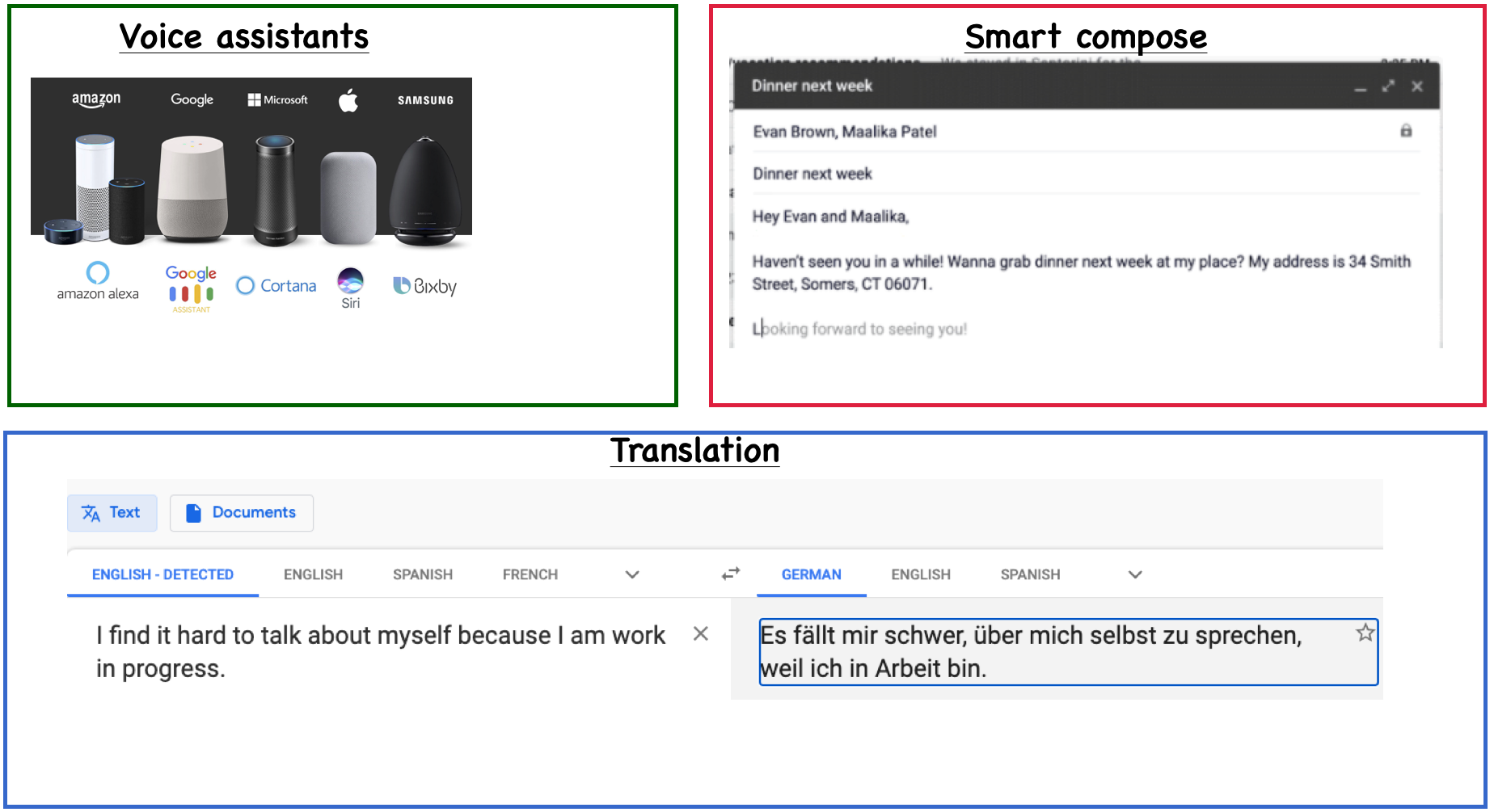
And of course, general-purpose conversational chatbots
ChatGPT (by OpenAI)
Claude (by Anthropic)
Gemini (by Google DeepMind; formerly Bard)
Copilot (by Microsoft, integrated into Office and Windows)
Perplexity AI (search-augmented conversational assistant)
...
Why is NLP hard?
Language is complex and subtle.
Language is ambiguous at different levels.
Language understanding involves common-sense knowledge and real-world reasoning.
All the problems related to representation and reasoning in artificial intelligence arise in this domain.
Exmaple: Lexical ambiguity
Example: Referential ambiguity
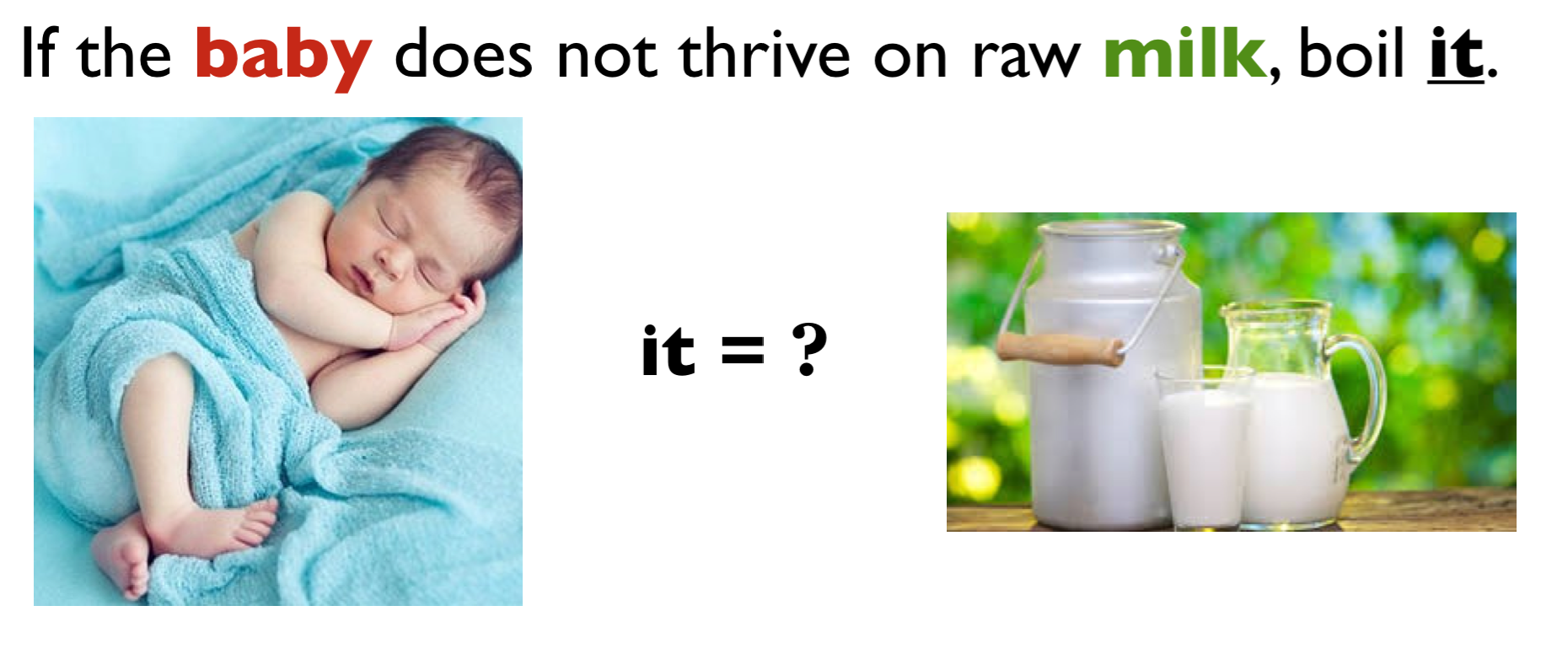
Example: Ambiguous news headlines
PROSTITUTES APPEAL TO POPE
appeal to means make a serious or urgent request or be attractive or interesting?
KICKING BABY CONSIDERED TO BE HEALTHY
kicking is used as an adjective or a verb?
MILK DRINKERS ARE TURNING TO POWDER
turning means becoming or take up?
NLP in industry
NLP powers a wide range of real-world applications across industries by enabling machines to understand and generate human language.
customer service (chatbots, voice assistants)
marketing (sentiment and trend analysis)
finance (document summarization, fraud detection)
healthcare (clinical text analysis, medical coding)
law (contract review, information extraction)
...
Overall goal of this lecture
Give you a quick introduction to you of this important field in artificial intelligence which extensively uses machine learning.
This is a huge field. We’ll focus on the following three topics which are likely to be useful for you.
Topic modeling
Word and text representations
Quick introduction to LLMs
Topic modeling
Why topic modeling?
Topic modeling introduction activity (~5 mins)
Consider the following documents.
toy_df = pd.read_csv(DATA_DIR + "toy_clustering.csv")
toy_dfDiscuss the following questions with your neighbour
Suppose you are asked to cluster these documents manually. How many clusters would you identify?
What are the prominent words in each cluster?
Are there documents which are a mixture of multiple clusters?
Last week, we learned about clustering. Let’s try K-Means clustering on this data with BOW representation:
from sklearn.feature_extraction.text import CountVectorizer

vec = CountVectorizer(stop_words="english")
toy_X = vec.fit_transform(toy_df["text"])
toy_X
<Compressed Sparse Row sparse matrix of dtype 'int64'
with 54 stored elements and shape (15, 16)>from sklearn.cluster import KMeans
km = KMeans(n_clusters=3)
kmeans_bow = KMeans(n_clusters=3, random_state=42)
kmeans_bow.fit(toy_X)
kmeans_bow_labels = kmeans_bow.labels_
toy_df["bow_kmeans"] = kmeans_bow_labels
toy_dfDo you see any problem here?
Topic modeling motivation
K-Means clustering gives each document a hard assignment; each document belongs to exactly one cluster.
But in reality, many documents are a mixture of topics.
A news article might talk about sports and politics.
A research paper might cover machine learning and linguistics.
In general, humans are pretty good at reading and understanding a document and answering questions such as
What is it about?
Which documents is it related to?
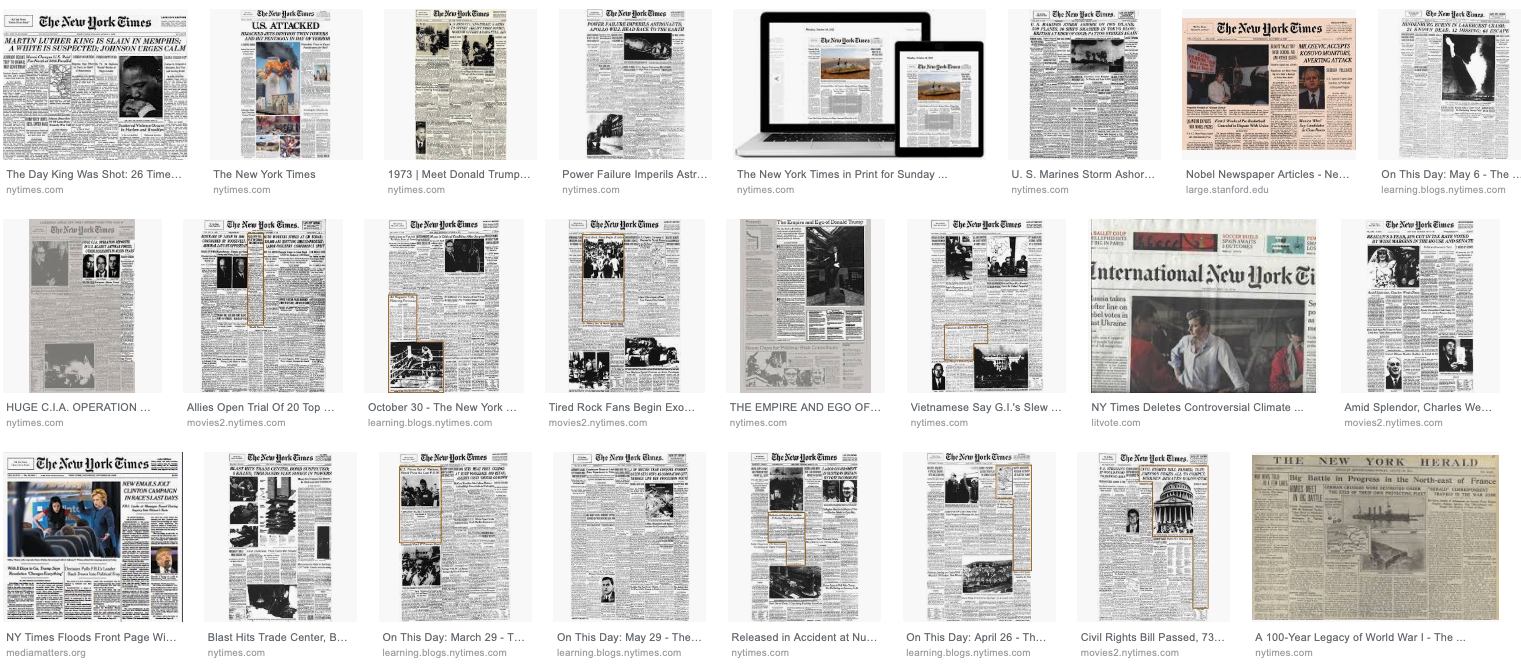
Imagine that you are given a large collection of documents on a variety of topics.
A corpus of news articles
Example: A corpus of food magazines

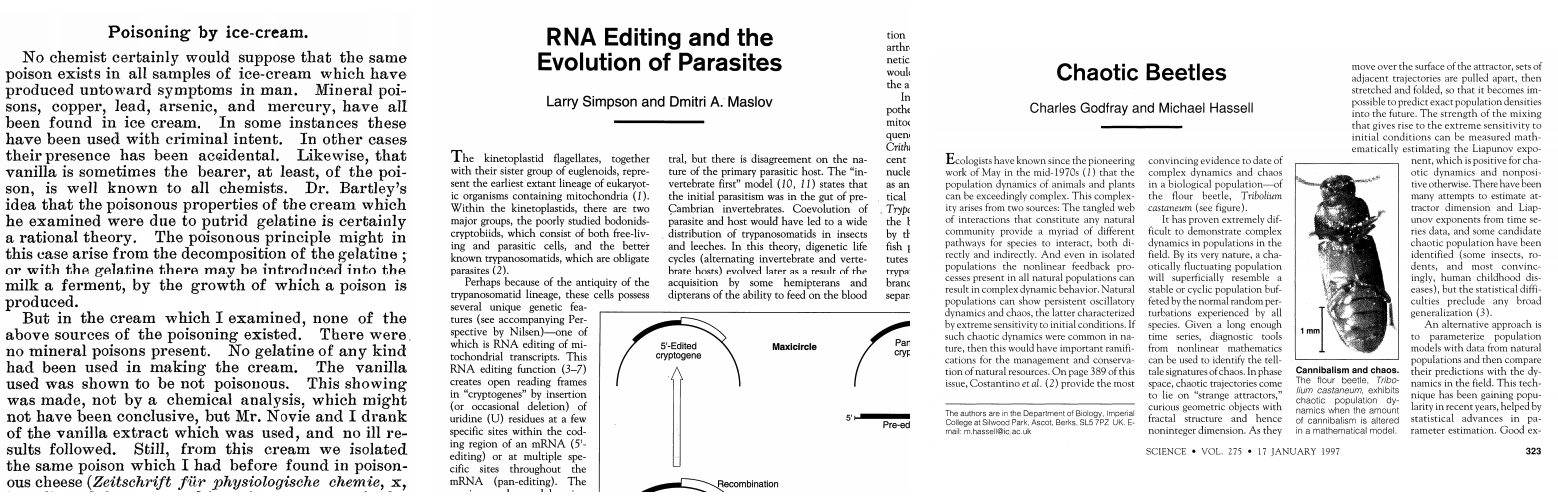
It would take years to read all documents and organize and categorize them so that they are easy to search.
You need an automated way
to get an idea of what’s going on in the data or
to pull documents related to a certain topic
Topic modeling gives you an ability to summarize the major themes in a large collection of documents (corpus).
Example: The major themes in a collection of news articles could be
politics
entertainment
sports
technology
...
Topic modeling is a great EDA tool to get a sense of what’s going on in a large corpus.
Some examples
If you want to pull documents related to a particular lawsuit.
You want to examine people’s sentiment towards a particular candidate and/or political party and so you want to pull tweets or Facebook posts related to election.
How do you do topic modeling?
A common tool to solve such problems is unsupervised ML methods.
Given the hyperparameter , the goal of topic modeling is to describe a set of documents using “topics”.
In unsupervised setting, the input of topic modeling is
A large collection of documents
A value for the hyperparameter (e.g., )
and the output is
Topic-words association
For each topic, what words describe that topic?
Document-topics association
For each document, what topics are expressed by the document?
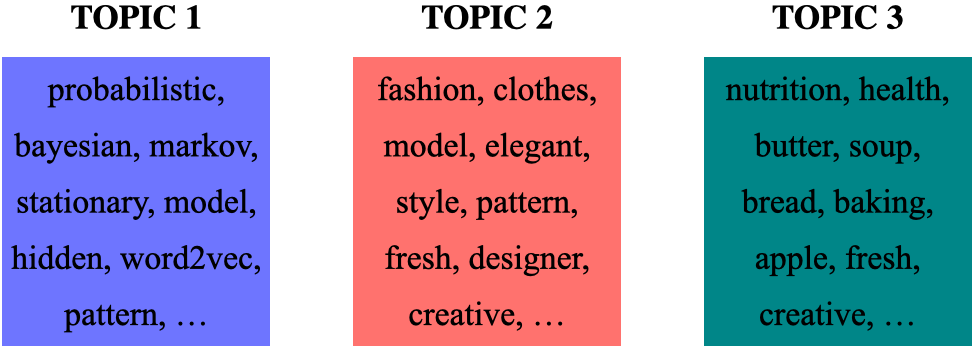
Topic modeling: Example
Topic-words association
For each topic, what words describe that topic?
A topic is a mixture of words.
Topic modeling: Example
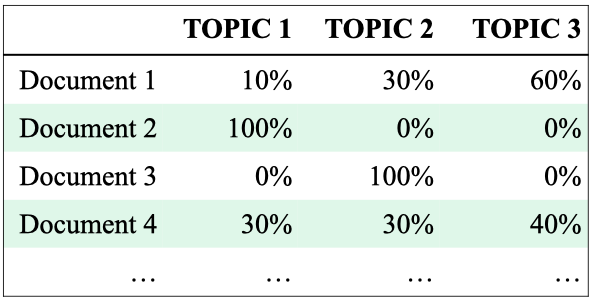
Document-topics association
For each document, what topics are expressed by the document?
A document is a mixture of topics.
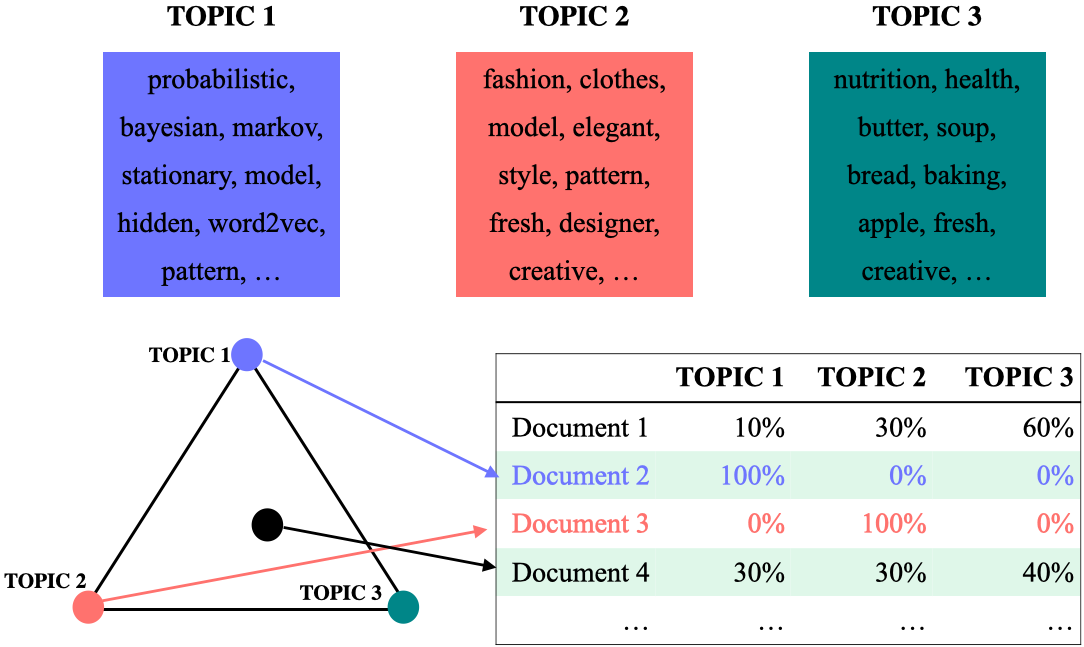
Topic modeling: Input and output
Input
A large collection of documents
A value for the hyperparameter (e.g., )
Output
For each topic, what words describe that topic?
For each document, what topics are expressed by the document?
Topic modeling: Some applications
Topic modeling is a great EDA tool to get a sense of what’s going on in a large corpus.
Some examples
If you want to pull documents related to a particular lawsuit.
You want to examine people’s sentiment towards a particular candidate and/or political party and so you want to pull tweets or Facebook posts related to election.
Topic modeling examples
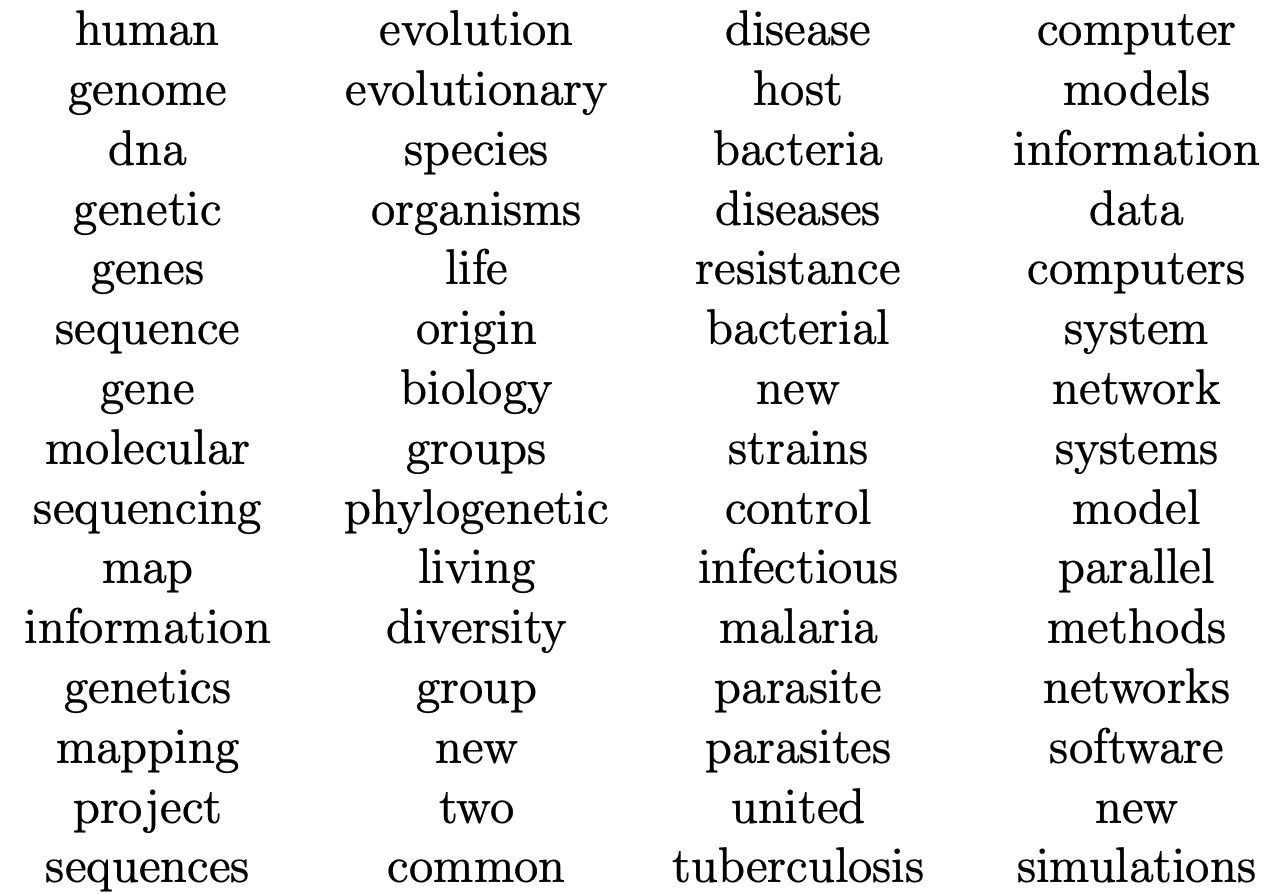
Topic modeling: output with interpretation
Assigning labels is a human thing.
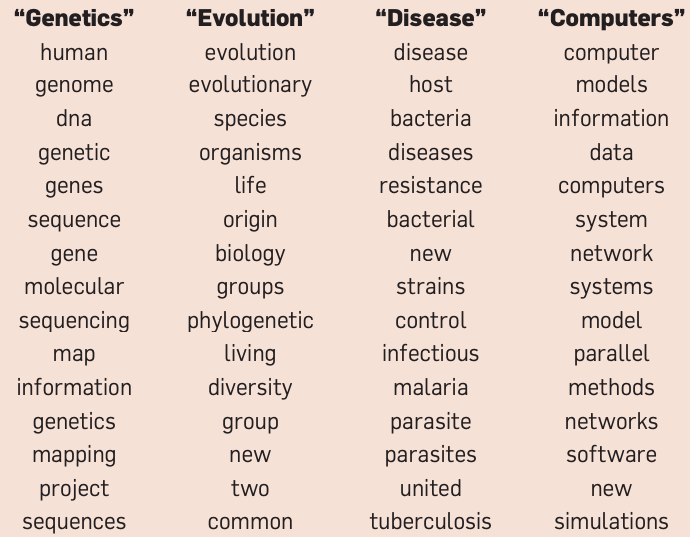
(Credit: David Blei’s presentation)
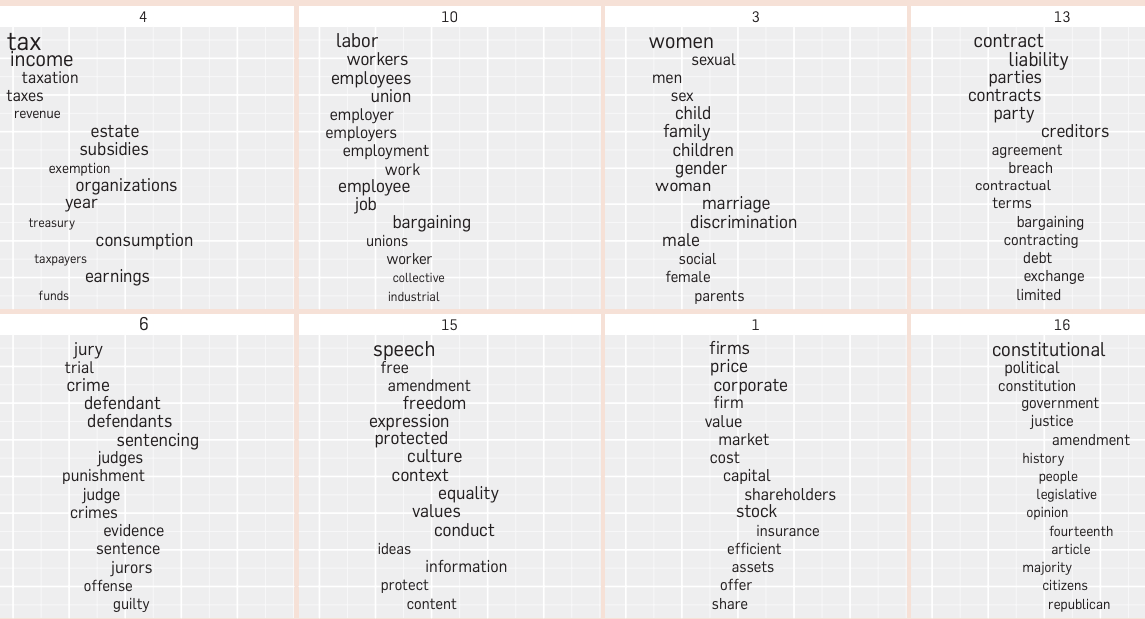
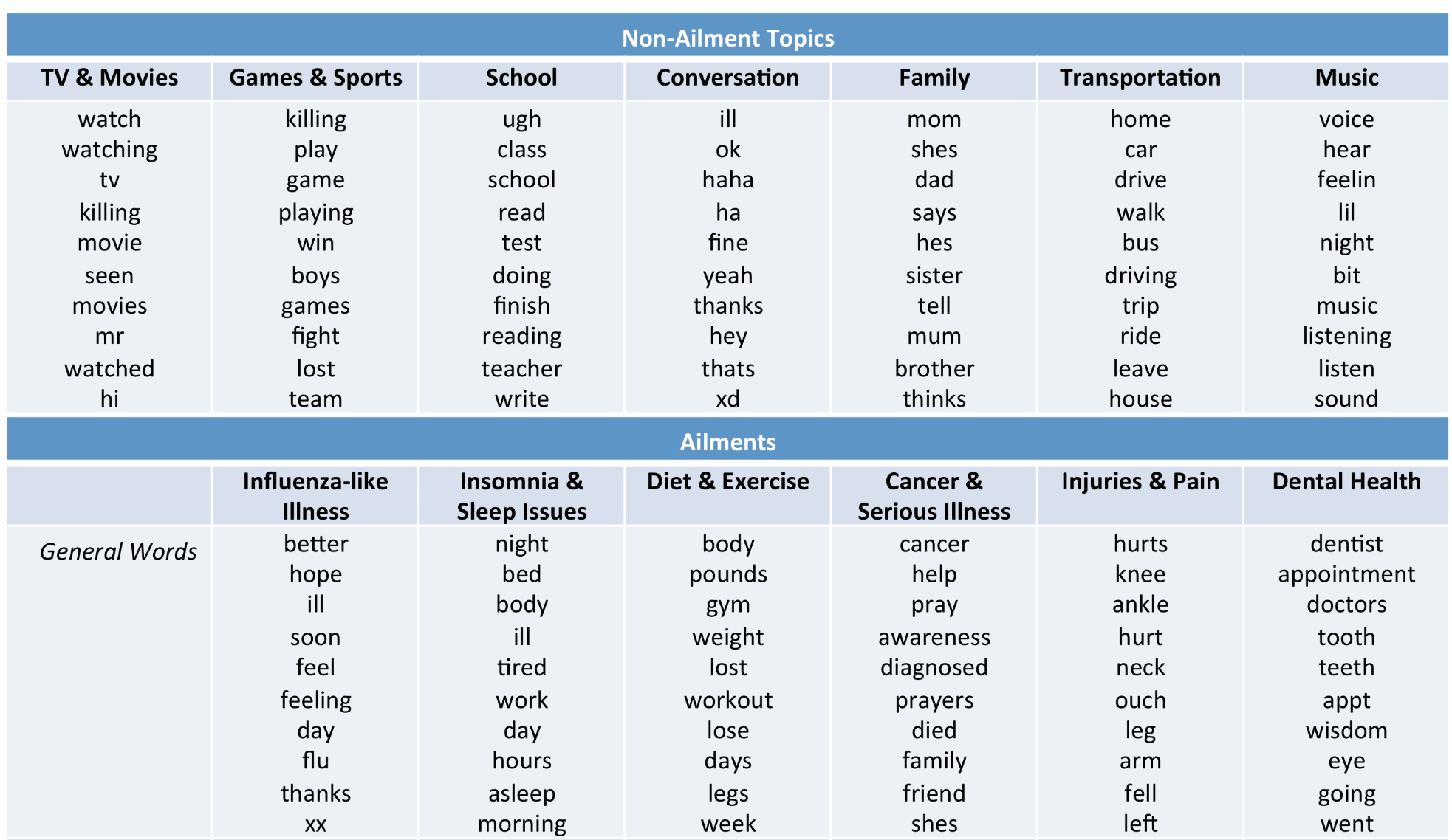
In this lecture, I will demonstrate how to perform topic modeling using the Latent Dirichlet Allocation model implemented in sklearn. We won’t delve into the inner workings of the model, as it falls outside the scope of this course. Instead, our objective is to understand how to apply it to your specific problems and comprehend the model’s input and output.
Topic modeling toy example
Let’s work with a toy example.
toy_df = pd.read_csv(DATA_DIR + "toy_lda_data.csv")
toy_dfInput to the LDA topic model is bag-of-words representation of text.
Let’s create bag-of-words representation of “text” column.
from sklearn.feature_extraction.text import CountVectorizer

vec = CountVectorizer(stop_words="english")
toy_X = vec.fit_transform(toy_df["text"])
toy_X
<Compressed Sparse Row sparse matrix of dtype 'int64'
with 124 stored elements and shape (39, 15)>vocab = vec.get_feature_names_out() # vocabulary
vocabarray(['apple', 'conference', 'creative', 'famous', 'fashion', 'fresh',
'health', 'hidden', 'kiwi', 'markov', 'model', 'nutrition',
'pattern', 'probabilistic', 'topic'], dtype=object)len(vocab)15Let’s try to create a topic model with sklearn’s LatentDirichletAllocation.
from sklearn.decomposition import LatentDirichletAllocation

n_topics = 3 # number of topics
lda = LatentDirichletAllocation(
    n_components=n_topics, learning_method="batch", max_iter=10, random_state=0
)
lda.fit(toy_X)
document_topics = lda.transform(toy_X)
Once we have a fitted model we can get the word-topic association and document-topic association
Word-topic association
lda.components_gives us the weights associated with each word for each topic. In other words, it tells us which word is important for which topic.
Document-topic association
Calling transform on the data gives us document-topic association.
lda.components_array([[ 0.33380754, 3.31038074, 0.33476534, 0.33397112, 0.36695134,
0.33439238, 0.33381373, 0.35771821, 0.33380649, 0.35771821,
17.78521263, 0.33380761, 0.3573886 , 17.31634363, 15.32791718],
[ 8.33224516, 0.33400489, 2.2173627 , 0.33411086, 0.33732465,
3.28753559, 5.33223002, 0.33435326, 9.33224759, 0.33435326,
0.33797555, 8.3322447 , 0.33462759, 0.33440682, 0.33425967],
[ 0.3339473 , 0.35561437, 0.44787197, 8.33191802, 14.29572402,
0.37807203, 0.33395626, 1.30792853, 0.33394593, 1.30792853,
13.87681182, 0.33394769, 2.30798381, 0.34924955, 0.33782315]])print("lda.components_.shape: {}".format(lda.components_.shape))lda.components_.shape: (3, 15)
import plotly.express as px
plot_lda_w_vectors(lda.components_, ['topic 0', 'topic 1', 'topic 2'], vocab, width=800, height=600)Let’s look at the words with highest weights for each topic more systematically.
np.argsort(lda.components_, axis=1)array([[ 8, 0, 11, 6, 3, 5, 2, 12, 7, 9, 4, 1, 14, 13, 10],
[ 1, 3, 14, 7, 9, 13, 12, 4, 10, 2, 5, 6, 11, 0, 8],
[ 8, 0, 11, 6, 14, 13, 1, 5, 2, 9, 7, 12, 3, 10, 4]])sorting = np.argsort(lda.components_, axis=1)[:, ::-1]
feature_names = np.array(vec.get_feature_names_out())import mglearn
mglearn.tools.print_topics(
topics=range(3),
feature_names=feature_names,
sorting=sorting,
topics_per_chunk=5,
n_words=10,
)topic 0 topic 1 topic 2
-------- -------- --------
model kiwi fashion
probabilistic apple model
topic nutrition famous
conference health pattern
fashion fresh hidden
markov creative markov
hidden model creative
pattern fashion fresh
creative pattern conference
fresh probabilistic probabilistic
Here is how we can interpret the topics
Topic 0 ML modeling
Topic 1 fruit and nutrition
Topic 2 fashion
Let’s look at distribution of topics for a document
toy_df.iloc[0]['text']'famous fashion model'document_topics[0]array([0.08791477, 0.08338644, 0.82869879])This document is made up of
~83% topic 2
~9% topic 0
~8% topic 1.
Topic modeling pipeline
Above we worked with toy data. In the real world, we usually need to preprocess the data before passing it to LDA.
Here are typical steps if you want to carry out topic modeling on real-world data.
Preprocess your corpus.
Train LDA.
Interpret your topics.
Data
import wikipedia
queries = [
"Artificial Intelligence",
"unsupervised learning",
"Supreme Court of Canada",
"Peace, Order, and Good Government",
"Canadian constitutional law",
"ice hockey",
]
wiki_dict = {"wiki query": [], "text": []}
for i in range(len(queries)):
wiki_dict["text"].append(wikipedia.page(queries[i]).content)
wiki_dict["wiki query"].append(queries[i])
wiki_df = pd.DataFrame(wiki_dict)
wiki_dfPreprocessing the corpus
Preprocessing is crucial!
Tokenization, converting text to lower case
Removing punctuation and stopwords
Discarding words with length < threshold or word frequency < threshold
Possibly lemmatization: Consider the lemmas instead of inflected forms.
Depending upon your application, restrict to specific part of speech;
For example, only consider nouns, verbs, and adjectives
Check out AppendixC for basic preprocessing in NLP.
We’ll use spaCy for preprocessing. Check out available token attributes here.
Even though you have spacy installed, you will need to install the following pre-trained spacy model in the course environment.
python -m spacy download en_core_web_md
import spacy
nlp = spacy.load("en_core_web_md", disable=["parser", "ner"])def preprocess(
doc,
min_token_len=2,
irrelevant_pos=["ADV", "PRON", "CCONJ", "PUNCT", "PART", "DET", "ADP", "SPACE"],
):
"""
Given text, min_token_len, and irrelevant_pos carry out preprocessing of the text
and return a preprocessed string.
Parameters
-------------
doc : (spaCy doc object)
the spacy doc object of the text
min_token_len : (int)
min_token_length required
irrelevant_pos : (list)
a list of irrelevant pos tags
Returns
-------------
(str) the preprocessed text
"""
clean_text = []
for token in doc:
if (
token.is_stop == False # Check if it's not a stopword
and len(token) > min_token_len # Check if the word meets minimum threshold
and token.pos_ not in irrelevant_pos
): # Check if the POS is in the acceptable POS tags
lemma = token.lemma_ # Take the lemma of the word
clean_text.append(lemma.lower())
return " ".join(clean_text)wiki_df["text_pp"] = [preprocess(text) for text in nlp.pipe(wiki_df["text"])]wiki_dffrom sklearn.feature_extraction.text import CountVectorizer
vec = CountVectorizer(stop_words='english')
X = vec.fit_transform(wiki_df["text_pp"])from sklearn.decomposition import LatentDirichletAllocation
n_topics = 3
lda = LatentDirichletAllocation(
n_components=n_topics, learning_method="batch", max_iter=10, random_state=0
)
document_topics = lda.fit_transform(X)print("lda.components_.shape: {}".format(lda.components_.shape))lda.components_.shape: (3, 4095)
sorting = np.argsort(lda.components_, axis=1)[:, ::-1]
feature_names = np.array(vec.get_feature_names_out())
import mglearn
mglearn.tools.print_topics(
topics=range(3),
feature_names=feature_names,
sorting=sorting,
topics_per_chunk=5,
n_words=10,
)topic 0 topic 1 topic 2
-------- -------- --------
displaystyle court hockey
algorithm intelligence player
learning problem team
law artificial ice
function machine league
training human play
learn use puck
provincial decision game
court include penalty
federal learning canada
Text representations and word embeddings
Motivation
Do large language models such as ChatGPT understand your questions to some extent and provide useful responses?
What would it take for a machine to “understand” language?
A first step is to find a way to represent text, numbers that capture meaning.
So far, we have seen bag-of-words (BoW) representation using CountVectorizer in sklearn.
Let’s quickly recall what that looks like.
from sklearn.feature_extraction.text import CountVectorizer
import pandas as pd

docs = ["This movie is amazing", "This movie is terrible"]
vec = CountVectorizer()
pd.DataFrame(vec.fit_transform(docs).toarray(), columns=vec.get_feature_names_out())What are some limitations of Bag-of-Words?
Sparse, high-dimensional vectors
Only capture word frequency
Ignore word order and context
Do not put similar words (e.g., happy, joyful) close together
BoW represents documents, but it treats each word as an independent token, there’s no notion of word meaning or relationships between words.
In this part of the lecture, we are going to go one step back and talk about word representations. Why care about word representations?
Words are the basic building blocks of language; the smallest units that carry meaning.
To truly understand a document, a model must first understand the meaning of the words in it.
If we can represent each word in a way that captures its meaning, then we can combine these representations to understand larger pieces of text (sentences, paragraphs, documents).
In other words, to represent text meaningfully, we must start with word meaning.
This brings us to a key question: How can we represent the meaning of individual words using numbers?
Distributional hypothesis
Activity: Context and word meaning
Pair up with a neighbor and try to guess the meanings of the following made-up words: flibbertigibbet and groak.
The plot twist was totally unexpected, making it a flibbertigibbet experience.
Despite its groak special effects, the storyline captivated my attention till the end.
I found the character development rather groak, failing to evoke empathy.
The cinematography is flibbertigibbet, showcasing breathtaking landscapes.
Sadly, the movie’s potential was overshadowed by its groak pacing.
Discussion:
How did you infer the meanings of these words?
Which words or phrases helped you?
In the previous activity, you guessed the meaning of flibbertigibbet and groak based on surrounding words.
That’s exactly what machines do when they learn from text.
This idea is called distributional hypothesis.
You shall know a word by the company it keeps.
Firth, 1957
In other words, words that appear in similar contexts tend to have similar meanings.
Word embeddings: The idea
Building on this idea, modern NLP systems learn word embeddings, dense vector representations of words that capture these contextual relationships.
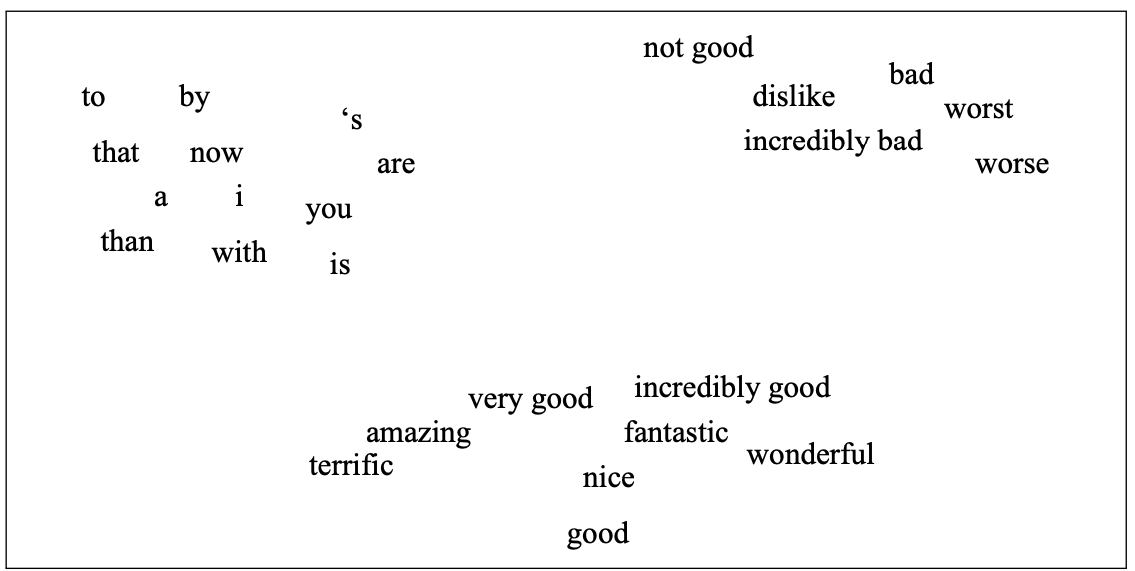
(Attribution: Jurafsky and Martin 3rd edition)
Example:
“The plot twist was totally unexpected, making it a flibbertigibbet experience.”
“The plot twist was totally unexpected, making it a delightful experience.”
The goal: words like flibbertigibbet and delightful should be close in the embedding space.
Word embeddings are built on the distributional hypothesis. They mathematically capture the idea that context defines meaning.
Measuring similarity between vectors
To create a vector space where similar words are close together, we need some metric to measure distances between representation.
We have used the Euclidean distance before for numeric features.
For sparse features, the most commonly used metrics are Dot product and Cosine distance.
Let’s look at an example.
Euclidean distance
Dot product similarity:
Cosine similarity: normalized version of dot product.
Where,
The L2 norm of is the magnitude of
The L2 norm of is the magnitude of
import numpy as np
from numpy import dot
from numpy.linalg import norm

# Euclidean distance: smaller distance --> more similar
def euclidean_distance(a, b):
    return np.linalg.norm(a - b)

# Dot product similarity: larger dot product --> more similar
def dot_product_similarity(a, b):
    return np.dot(a, b)

# Cosine similarity: larger similarity score --> more similar
def cosine_similarity(a, b):
    return dot(a, b) / (norm(a) * norm(b))
v1 = np.array([2, 4, 3])
v2 = np.array([5, 1, 0])
print(f"Euclidean Distance: {euclidean_distance(v1, v2):.4f}")
print(f"Dot Product Similarity: {dot_product_similarity(v1, v2):.4f}")
print(f"Cosine Similarity: {cosine_similarity(v1, v2):.4f}")
Euclidean Distance: 5.1962
Dot Product Similarity: 14.0000
Cosine Similarity: 0.5098
Discussion question
Suppose you are recommending items based on similarity between items. Given a query vector “Query” in the picture below and the three item vectors, determine the ranking for the three similarity measures below:
Similarity based on Euclidean distance
similarity based on dot product
Cosine similarity
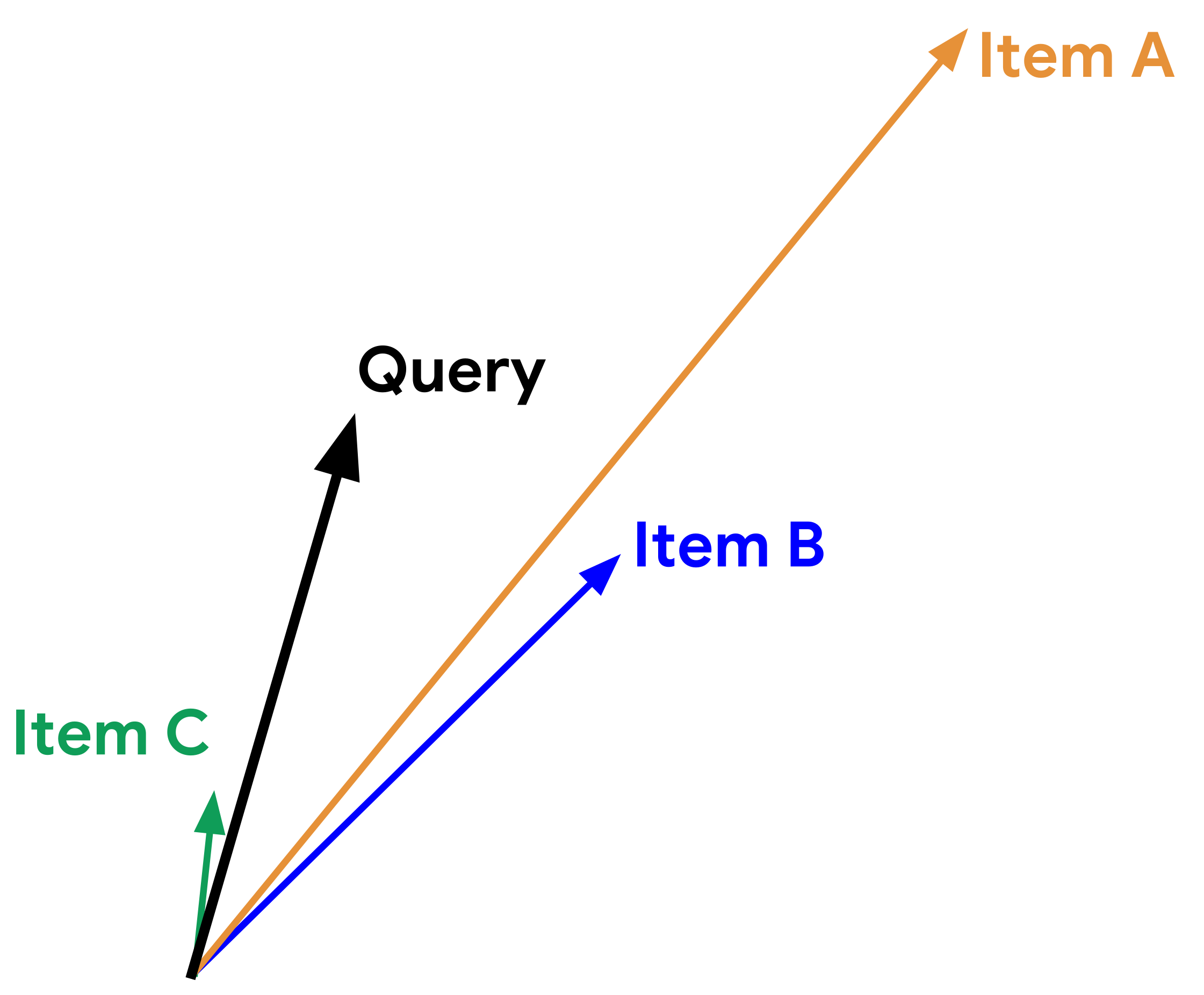
Adapted from here.
Using pre-trained word embeddings
Creating these representations on your own is resource intensive. So people typically use “pretrained” embeddings. A number of pre-trained word embeddings are available. The most popular ones are:
trained on several corpora using the word2vec algorithm
pretrained embeddings for 12 languages
trained using the GloVe algorithm
published by Stanford University
fastText pre-trained embeddings for 294 languages
trained using the fastText algorithm
published by Facebook
How to use pretrained embeddings
Let’s try Google News pre-trained embeddings.
You can download pre-trained embeddings from their original source.
Gensimprovides an api to conveniently load them. You need to install thegensimpackage in the course environment.
conda install conda-forge::gensim
If you get errors when you import gensim, try to install the following in the course environment.pip install --upgrade gensim scipy
import gensim
import gensim.downloader as api

print(list(api.info()["models"].keys()))
['fasttext-wiki-news-subwords-300', 'conceptnet-numberbatch-17-06-300', 'word2vec-ruscorpora-300', 'word2vec-google-news-300', 'glove-wiki-gigaword-50', 'glove-wiki-gigaword-100', 'glove-wiki-gigaword-200', 'glove-wiki-gigaword-300', 'glove-twitter-25', 'glove-twitter-50', 'glove-twitter-100', 'glove-twitter-200', '__testing_word2vec-matrix-synopsis']
For the demonstration purpose, we’ll use word2vec-google-news-300. This model used to be available through gensim.downloader, but due to licensing and size (1.5+ GB), it’s no longer hosted on the default Gensim data server.
So I have manually download them from this source and then loaded them locally:
# It'll take a while to run this when you try it out for the first time.

from gensim.models import KeyedVectors

model_path = DATA_DIR + "GoogleNews-vectors-negative300.bin.gz"
google_news_vectors = KeyedVectors.load_word2vec_format(model_path, binary=True)
print("Size of vocabulary: ", len(google_news_vectors))Size of vocabulary: 3000000
google_news_vectorsabove has 300 dimensional word vectors for 3,000,000 unique words/phrases from Google news.
What can we do with these word vectors?
Let’s examine word vector for the word UBC.
google_news_vectors["UBC"][:20] # Representation of the word UBCarray([-0.3828125 , -0.18066406, 0.10644531, 0.4296875 , 0.21582031,
-0.10693359, 0.13476562, -0.08740234, -0.14648438, -0.09619141,
0.02807617, 0.01409912, -0.12890625, -0.21972656, -0.41210938,
-0.1875 , -0.11914062, -0.22851562, 0.19433594, -0.08642578],
dtype=float32)google_news_vectors["UBC"].shape(300,)It’s a short and a dense (we do not see any zeros) vector!
Finding similar words
Given word , search in the vector space for the word closest to as measured by cosine similarity.
google_news_vectors.most_similar("UBC")[('UVic', 0.7886475920677185),
('SFU', 0.7588528394699097),
('Simon_Fraser', 0.7356574535369873),
('UFV', 0.688043475151062),
('VIU', 0.6778583526611328),
('Kwantlen', 0.6771429181098938),
('UBCO', 0.6734487414360046),
('UPEI', 0.673112690448761),
('UBC_Okanagan', 0.6709133386611938),
('Lakehead_University', 0.6622507572174072)]google_news_vectors.most_similar("information")[('info', 0.7363681793212891),
('infomation', 0.680029571056366),
('infor_mation', 0.673384964466095),
('informaiton', 0.6639008522033691),
('informa_tion', 0.660125732421875),
('informationon', 0.633933424949646),
('informationabout', 0.6320978999137878),
('Information', 0.6186580657958984),
('informaion', 0.6093292832374573),
('details', 0.6063088774681091)]If you want to extract all documents containing words similar to information, you could use this information.
Google News embeddings also support multi-word phrases.
google_news_vectors.most_similar("british_columbia")[('alberta', 0.6111123561859131),
('canadian', 0.6086404323577881),
('ontario', 0.6031432151794434),
('erik', 0.5993571281433105),
('dominican_republic', 0.5925410985946655),
('costco', 0.5824530124664307),
('rhode_island', 0.5804311633110046),
('dreampharmaceuticals', 0.5755444169044495),
('canada', 0.5630921721458435),
('austin', 0.5623061656951904)]Why “erik” and “costco” show up for “british_columbia”? Note that word embeddings capture how words are used, not what they mean.
Finding similarity scores between words
google_news_vectors.similarity("Canada", "hockey")np.float32(0.27610135)google_news_vectors.similarity("Japan", "hockey")np.float32(0.0019627889)word_pairs = [
("height", "tall"),
("height", "official"),
("pineapple", "mango"),
("pineapple", "juice"),
("sun", "robot"),
("GPU", "hummus"),
]
for pair in word_pairs:
print(
"The similarity between %s and %s is %0.3f"
% (pair[0], pair[1], google_news_vectors.similarity(pair[0], pair[1]))
)The similarity between height and tall is 0.473
The similarity between height and official is 0.002
The similarity between pineapple and mango is 0.668
The similarity between pineapple and juice is 0.418
The similarity between sun and robot is 0.029
The similarity between GPU and hummus is 0.094
We are getting reasonable word similarity scores!!
Success of word2vec
This analogy example often comes up when people talk about word2vec, which was used by the authors of this method.
MAN : KING :: WOMAN : ?
What is the word that is similar to WOMAN in the same sense as KING is similar to MAN?
Perform a simple algebraic operations with the vector representation of words.
Search in the vector space for the word closest to measured by cosine distance.
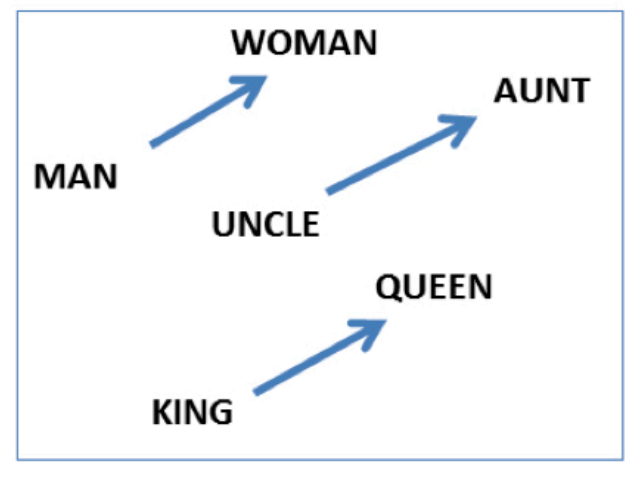
(Credit: Mikolov et al. 2013)
def analogy(word1, word2, word3, model=google_news_vectors):
    """
    Returns analogy word using the given model.

    Parameters
    --------------
    word1 : (str)
        word1 in the analogy relation
    word2 : (str)
        word2 in the analogy relation
    word3 : (str)
        word3 in the analogy relation
    model :
        word embedding model

    Returns
    ---------------
        pd.dataframe
    """
    print("%s : %s :: %s : ?" % (word1, word2, word3))
    sim_words = model.most_similar(positive=[word3, word2], negative=[word1])
    return pd.DataFrame(sim_words, columns=["Analogy word", "Score"])
analogy("man", "king", "woman")man : king :: woman : ?
analogy("Montreal", "Canadiens", "Vancouver")Montreal : Canadiens :: Vancouver : ?
analogy("Toronto", "UofT", "Vancouver")Toronto : UofT :: Vancouver : ?
analogy("Gauss", "mathematician", "Bob_Dylan")Gauss : mathematician :: Bob_Dylan : ?
So you can imagine these models being useful in many meaning-related tasks.
Examples of semantic and syntactic relationships
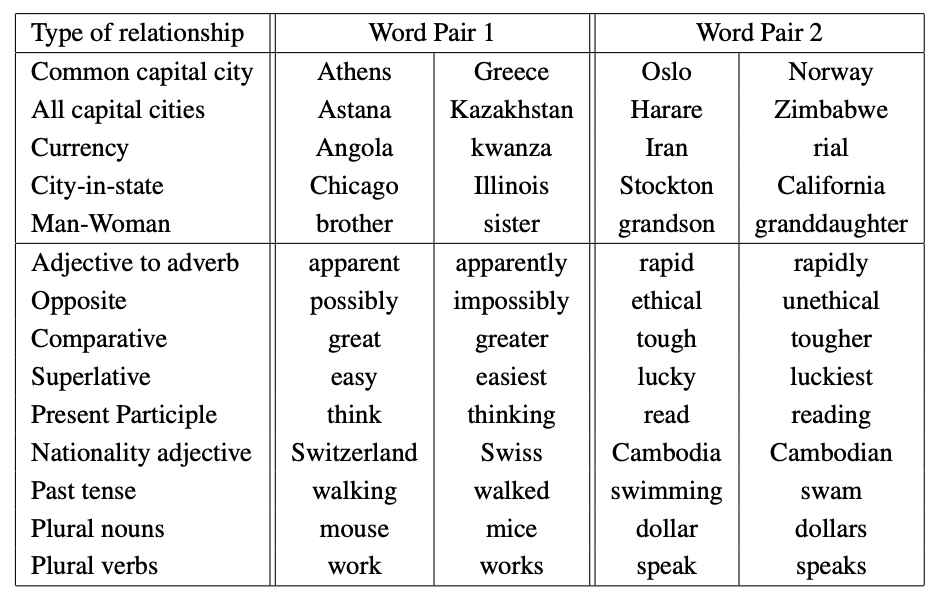
(Credit: Mikolov 2013)
Implicit biases and stereotypes in word embeddings
Embeddings reflect biases in the data they are trained on.
analogy("man", "computer_programmer", "woman")man : computer_programmer :: woman : ?

Embeddings reflect gender stereotypes present in broader society.
They may also amplify these stereotypes because of their widespread usage.
See the paper Man is to Computer Programmer as Woman is to ....
Most of the modern embeddings are de-biased for some obvious biases. For example, we won’t see this with glove_wiki_vectors. We changed “computer_programmer” to “programmer” because
“computer_programmer” is not in the vocabulary of glove_wiki_vectors.
glove_wiki_vectors = api.load('glove-wiki-gigaword-300')len(glove_wiki_vectors)400000analogy("man", "programmer", "woman", model = glove_wiki_vectors)man : programmer :: woman : ?
Other popular methods to get embeddings
NLP library by Facebook research
Includes an algorithm which is an extension to word2vec
Helps deal with unknown words elegantly
Breaks words into several n-gram subwords
Example: trigram sub-words for berry are ber, err, rry
Embedding(berry) = embedding(ber) + embedding(err) + embedding(rry)
(Optional) GloVe: Global Vectors for Word Representation
Starts with the co-occurrence matrix
Co-occurrence can be interpreted as an indicator of semantic proximity of words
Takes advantage of global count statistics
Predicts co-occurrence ratios
Loss based on word frequency
Beyond words: sentence embeddings
Word embeddings capture individual word meanings.
But what about sentences or paragraphs?
Modern deep learning models represent whole texts using sentence embeddings, where the meaning of a sentence is captured in a single vector. This is what you used in HW6.
from sentence_transformers import SentenceTransformer, util

model = SentenceTransformer("all-MiniLM-L6-v2")

sentences = [
"The cat sat on the mat.",
"A feline rested on the rug.",
"I love teaching you machine learning.",
"Natural language processing is fascinating."
]

# Compute embeddings
embeddings = model.encode(sentences)

# Compute pairwise cosine similarities
similarities = util.cos_sim(embeddings, embeddings).numpy()

# Create a table
df_sim = pd.DataFrame(similarities, index=sentences, columns=sentences)
df_sim.round(3)
/Users/kvarada/miniforge3/envs/cpsc330/lib/python3.13/site-packages/torch/nn/modules/module.py:1762: FutureWarning:
`encoder_attention_mask` is deprecated and will be removed in version 4.55.0 for `BertSdpaSelfAttention.forward`.
(Optional) Quick peek: Getting an embedding from an LLM API
Under the hood, all large language models (LLMs) represent words and sentences as vectors, also called embeddings. These embeddings capture the meaning of text based on how words appear in context.
In this high-dimensional space, words or sentences with similar meanings lie close together, while unrelated ideas are farther apart.
LLMs like ChatGPT use these embeddings as the foundation for understanding meaning, context, and intent -- powering applications such as chatbots, search, summarization, and many others.
The quality of these embeddings largely determines how well a model understands your question and how good its responses are.
Assuming that you’ve your OPENAI_API_KEY setup in the course environment, the following code will return embeddings associated with these sentences.
# from openai import OpenAI
# client = OpenAI()

# response = client.embeddings.create(
# input="Machine learning is fun!",
# model="text-embedding-3-small"
# )
# len(response.data[0].embedding)
Key takeaways
BoW simple frequency-based text representation
Word embeddings capture meaning and similarity
Sentence embeddings meaning at the sentence level
LLMs context-aware, dynamic embeddings at scale
Summary
NLP is a big and very active field.
We broadly explored three topics:
Topic modeling
Word and text representations embeddings using pretrained models
Introduction to large language models
Here are some resources if you want to get into NLP.
Check out this CPSC course on NLP.
The first resource I would recommend is the following book by Jurafsky and Martin. It’s very approachable and fun. And the current edition is available online.
There is a course taught at Stanford called “From languages to Information” by one of the co-authors of the above book, and it might be a good introduction to NLP for you. Most of the course material and videos are available for free.
If you are into deep learning, you may refer to this course. Again, all lecture videos are available on youtube.
If you want to look at current advancements in the field, you’ll find all NLP related publications here.
- (N.d.). Public Library of Science (PLoS). 10.1371/journal.pone.0103408.g002