
Lecture 21: Survival analysis
UBC 2025-26
Imports
import os
import sys

import matplotlib.pyplot as plt
import numpy as np
import pandas as pd
from sklearn.compose import ColumnTransformer, make_column_transformer
from sklearn.dummy import DummyClassifier
from sklearn.ensemble import RandomForestClassifier, RandomForestRegressor
from sklearn.impute import SimpleImputer
from sklearn.linear_model import LogisticRegression, Ridge
from sklearn.metrics import confusion_matrix
from sklearn.model_selection import (
    cross_val_predict,
    cross_val_score,
    cross_validate,
    train_test_split,
)
from sklearn.pipeline import Pipeline, make_pipeline
from sklearn.preprocessing import (
    FunctionTransformer,
    OneHotEncoder,
    OrdinalEncoder,
    StandardScaler,
)

sys.path.append(os.path.join(os.path.abspath(".."), "code"))
from utils import *

plt.rcParams["font.size"] = 12

import warnings

warnings.filterwarnings("default")
DATA_DIR = os.path.join(os.path.abspath(".."), "data/")
import warnings
warnings.filterwarnings(
"ignore",
message=".*`disp` and `iprint` options of the L-BFGS-B solver are deprecated.*",
)Learning objectives
Explain what is right-censored data.
Explain the problem with treating right-censored data the same as “regular” data.
Determine whether survival analysis is an appropriate tool for a given problem.
Apply survival analysis in Python using the
lifelinespackage.Interpret a survival curve, such as the Kaplan-Meier curve.
Interpret the coefficients of a fitted Cox proportional hazards model.
Make predictions for existing individuals and interpret these predictions.
❓❓ Questions for you
(iClicker) Exercise 20.1
Select all of the following statements which are TRUE.
(A) We need to be careful when splitting the data when working with time series data.
(B) Cross-validation in time series can be randomly applied like in other machine learning tasks.
(C) In time series forecasting, the future value of a series can only be predicted based on its past values and cannot incorporate other variables.
(D) When we used
RandomForestRegressormodel on the POSIX time feature, it predicted a straight line on the test data because tree-based models are inherently unable to extrapolate (i.e., make predictions outside the range of the training data).
Recap
Time series analysis is used when there is a temporal aspect in the data.
Data splitting: Data should be split based on time to avoid future data leaking into the training set.
Essential questions for Exploratory Data Analysis (EDA):
What is the frequency of data collection (e.g., hourly, daily)?
How many time series are present within the dataset?
Are there any gaps or missing values in the data?
Feature engineering
Derived new features from the date/time column.
Appropriately encoded features based on the chosen model.
Created lag features to incorporate past values for prediction.
Baseline model approach: Employ a simple model, such as using today’s target value to predict tomorrow’s, as a starting point for comparison.
Cross-Validation Method for Time Series: In
sklearn, useTimeSeriesSplitas thecvparameter in functions likecross_validateorcross_val_scorefor time-appropriate validation.Strategies for long-term forecasting:
Generate forecasts for sequential time steps by assuming the predictions for the previous steps are accurate.
Trends
A ‘days since’ feature to capture the trend over time
Customer churn
Customer churn, also known as customer attrition, refers to the phenomenon where customers or subscribers stop doing business with a company or service.
The bar-chart below is showing the monthly subscriber churn rates for various streaming services.
Is a smaller or larger attrition rate considered more desirable?

Imagine that you are working for a subscription-based telecom company.
They want to predict when a specific customer will churn so that they can come up with retention strategies for different customer segments.
We want to model “time to churn” to understand different factors affecting customer churn.
Is it possible to use machine learning to predict whether a specific customer will churn?
Let’s work with this dataset Customer Churn Dataset, which is collected at a fixed time.
df = pd.read_csv(DATA_DIR + "WA_Fn-UseC_-Telco-Customer-Churn.csv")
train_df, test_df = train_test_split(df, random_state=123)
train_df.head()We are interested in predicting customer churn: the “Churn” column.
How will you approach this problem with the approaches we have seen so far?
How about treating this as a binary classification problem where we want to predict
Churn(yes/no) from these -other columns.Before we look into survival analysis, let’s just treat it as a binary classification model where we want to predict whether a customer churned or not.
train_df.shape(5282, 21)train_df["Churn"].value_counts()Churn
No 3912
Yes 1370
Name: count, dtype: int64train_df.info()<class 'pandas.core.frame.DataFrame'>
Index: 5282 entries, 6464 to 3582
Data columns (total 21 columns):
# Column Non-Null Count Dtype
--- ------ -------------- -----
0 customerID 5282 non-null object
1 gender 5282 non-null object
2 SeniorCitizen 5282 non-null int64
3 Partner 5282 non-null object
4 Dependents 5282 non-null object
5 tenure 5282 non-null int64
6 PhoneService 5282 non-null object
7 MultipleLines 5282 non-null object
8 InternetService 5282 non-null object
9 OnlineSecurity 5282 non-null object
10 OnlineBackup 5282 non-null object
11 DeviceProtection 5282 non-null object
12 TechSupport 5282 non-null object
13 StreamingTV 5282 non-null object
14 StreamingMovies 5282 non-null object
15 Contract 5282 non-null object
16 PaperlessBilling 5282 non-null object
17 PaymentMethod 5282 non-null object
18 MonthlyCharges 5282 non-null float64
19 TotalCharges 5282 non-null object
20 Churn 5282 non-null object
dtypes: float64(1), int64(2), object(18)
memory usage: 907.8+ KB
Question: Does this mean there is no missing data?
Ok, let’s try our usual approach:
train_df["SeniorCitizen"].value_counts()SeniorCitizen
0 4430
1 852
Name: count, dtype: int64numeric_features = ["tenure", "MonthlyCharges", "TotalCharges"]
drop_features = ["customerID"]
passthrough_features = ["SeniorCitizen"]
target_column = ["Churn"]
# the rest are categorical
categorical_features = list(
set(train_df.columns)
- set(numeric_features)
- set(passthrough_features)
- set(drop_features)
- set(target_column)
)preprocessor = make_column_transformer(
(StandardScaler(), numeric_features),
(OneHotEncoder(), categorical_features),
("passthrough", passthrough_features),
("drop", drop_features),
)# preprocessor.fit(train_df);Hmmm, one of the numeric features is causing problems?
df.info()<class 'pandas.core.frame.DataFrame'>
RangeIndex: 7043 entries, 0 to 7042
Data columns (total 21 columns):
# Column Non-Null Count Dtype
--- ------ -------------- -----
0 customerID 7043 non-null object
1 gender 7043 non-null object
2 SeniorCitizen 7043 non-null int64
3 Partner 7043 non-null object
4 Dependents 7043 non-null object
5 tenure 7043 non-null int64
6 PhoneService 7043 non-null object
7 MultipleLines 7043 non-null object
8 InternetService 7043 non-null object
9 OnlineSecurity 7043 non-null object
10 OnlineBackup 7043 non-null object
11 DeviceProtection 7043 non-null object
12 TechSupport 7043 non-null object
13 StreamingTV 7043 non-null object
14 StreamingMovies 7043 non-null object
15 Contract 7043 non-null object
16 PaperlessBilling 7043 non-null object
17 PaymentMethod 7043 non-null object
18 MonthlyCharges 7043 non-null float64
19 TotalCharges 7043 non-null object
20 Churn 7043 non-null object
dtypes: float64(1), int64(2), object(18)
memory usage: 1.1+ MB
Oh, looks like TotalCharges is not a numeric type. What if we change the type of this column to float?
train_df["TotalCharges"] = train_df["TotalCharges"].astype(float)---------------------------------------------------------------------------
ValueError Traceback (most recent call last)
Cell In[12], line 1
----> 1 train_df["TotalCharges"] = train_df["TotalCharges"].astype(float)
File ~/miniforge3/envs/cpsc330/lib/python3.13/site-packages/pandas/core/generic.py:6665, in NDFrame.astype(self, dtype, copy, errors)
6659 results = [
6660 ser.astype(dtype, copy=copy, errors=errors) for _, ser in self.items()
6661 ]
6663 else:
6664 # else, only a single dtype is given
-> 6665 new_data = self._mgr.astype(dtype=dtype, copy=copy, errors=errors)
6666 res = self._constructor_from_mgr(new_data, axes=new_data.axes)
6667 return res.__finalize__(self, method="astype")
File ~/miniforge3/envs/cpsc330/lib/python3.13/site-packages/pandas/core/internals/managers.py:449, in BaseBlockManager.astype(self, dtype, copy, errors)
446 elif using_copy_on_write():
447 copy = False
--> 449 return self.apply(
450 "astype",
451 dtype=dtype,
452 copy=copy,
453 errors=errors,
454 using_cow=using_copy_on_write(),
455 )
File ~/miniforge3/envs/cpsc330/lib/python3.13/site-packages/pandas/core/internals/managers.py:363, in BaseBlockManager.apply(self, f, align_keys, **kwargs)
361 applied = b.apply(f, **kwargs)
362 else:
--> 363 applied = getattr(b, f)(**kwargs)
364 result_blocks = extend_blocks(applied, result_blocks)
366 out = type(self).from_blocks(result_blocks, self.axes)
File ~/miniforge3/envs/cpsc330/lib/python3.13/site-packages/pandas/core/internals/blocks.py:784, in Block.astype(self, dtype, copy, errors, using_cow, squeeze)
781 raise ValueError("Can not squeeze with more than one column.")
782 values = values[0, :] # type: ignore[call-overload]
--> 784 new_values = astype_array_safe(values, dtype, copy=copy, errors=errors)
786 new_values = maybe_coerce_values(new_values)
788 refs = None
File ~/miniforge3/envs/cpsc330/lib/python3.13/site-packages/pandas/core/dtypes/astype.py:237, in astype_array_safe(values, dtype, copy, errors)
234 dtype = dtype.numpy_dtype
236 try:
--> 237 new_values = astype_array(values, dtype, copy=copy)
238 except (ValueError, TypeError):
239 # e.g. _astype_nansafe can fail on object-dtype of strings
240 # trying to convert to float
241 if errors == "ignore":
File ~/miniforge3/envs/cpsc330/lib/python3.13/site-packages/pandas/core/dtypes/astype.py:182, in astype_array(values, dtype, copy)
179 values = values.astype(dtype, copy=copy)
181 else:
--> 182 values = _astype_nansafe(values, dtype, copy=copy)
184 # in pandas we don't store numpy str dtypes, so convert to object
185 if isinstance(dtype, np.dtype) and issubclass(values.dtype.type, str):
File ~/miniforge3/envs/cpsc330/lib/python3.13/site-packages/pandas/core/dtypes/astype.py:133, in _astype_nansafe(arr, dtype, copy, skipna)
129 raise ValueError(msg)
131 if copy or arr.dtype == object or dtype == object:
132 # Explicit copy, or required since NumPy can't view from / to object.
--> 133 return arr.astype(dtype, copy=True)
135 return arr.astype(dtype, copy=copy)
ValueError: could not convert string to float: ' 'Argh!!
for val in train_df["TotalCharges"]:
    try:
        float(val)
    except ValueError:
        print(val)
Any ideas?
Well, it turns out we can’t see those problematic values because they are whitespace!
for val in train_df["TotalCharges"]:
    try:
        float(val)
    except ValueError:
        print('"%s"' % val)
" "
" "
" "
" "
" "
" "
" "
" "
Let’s replace the whitespaces with NaNs.
train_df = train_df.assign(
    TotalCharges=train_df["TotalCharges"].replace(" ", np.nan).astype(float)
)
test_df = test_df.assign(
    TotalCharges=test_df["TotalCharges"].replace(" ", np.nan).astype(float)
)train_df.info()<class 'pandas.core.frame.DataFrame'>
Index: 5282 entries, 6464 to 3582
Data columns (total 21 columns):
# Column Non-Null Count Dtype
--- ------ -------------- -----
0 customerID 5282 non-null object
1 gender 5282 non-null object
2 SeniorCitizen 5282 non-null int64
3 Partner 5282 non-null object
4 Dependents 5282 non-null object
5 tenure 5282 non-null int64
6 PhoneService 5282 non-null object
7 MultipleLines 5282 non-null object
8 InternetService 5282 non-null object
9 OnlineSecurity 5282 non-null object
10 OnlineBackup 5282 non-null object
11 DeviceProtection 5282 non-null object
12 TechSupport 5282 non-null object
13 StreamingTV 5282 non-null object
14 StreamingMovies 5282 non-null object
15 Contract 5282 non-null object
16 PaperlessBilling 5282 non-null object
17 PaymentMethod 5282 non-null object
18 MonthlyCharges 5282 non-null float64
19 TotalCharges 5274 non-null float64
20 Churn 5282 non-null object
dtypes: float64(2), int64(2), object(17)
memory usage: 907.8+ KB
But now we are going to have missing values and we need to include imputation for numeric features in our preprocessor.
preprocessor = make_column_transformer(
    (
        make_pipeline(SimpleImputer(strategy="median"), StandardScaler()),
        numeric_features,
    ),
    (OneHotEncoder(handle_unknown="ignore"), categorical_features),
    ("passthrough", passthrough_features),
    ("drop", drop_features),
    verbose_feature_names_out=False,
)
Now let’s try that again...
preprocessor.fit(train_df);It worked! Let’s get the column names of the transformed data from the column transformer.
new_columns = preprocessor.get_feature_names_out()X_train_enc = pd.DataFrame(
preprocessor.transform(train_df), index=train_df.index, columns=new_columns
)
X_test_enc = pd.DataFrame(
preprocessor.transform(test_df), index=test_df.index, columns=new_columns
)X_train_enc.head()results = {}X_train = train_df.drop(columns=["Churn"])
X_test = test_df.drop(columns=["Churn"])
y_train = train_df["Churn"]
y_test = test_df["Churn"]DummyClassifier
dc = DummyClassifier()results["dummy"] = mean_std_cross_val_scores(
dc, X_train, y_train, return_train_score=True
)
pd.DataFrame(results).TDummy model scores are pretty good because we have class imbalance.
y_train.value_counts()Churn
No 3912
Yes 1370
Name: count, dtype: int64LogisticRegression
lr = make_pipeline(preprocessor, LogisticRegression(max_iter=1000))results["logistic regression"] = mean_std_cross_val_scores(
lr, X_train, y_train, return_train_score=True
)
pd.DataFrame(results).Tconfusion_matrix(y_train, cross_val_predict(lr, X_train, y_train))array([[3515, 397],
[ 636, 734]])Logistic regression beats the dummy model.
But it seems like we have many false negatives.
RandomForestClassifier
Let’s try random forest model.
rf = make_pipeline(preprocessor, RandomForestClassifier(n_estimators=100))results["random forest"] = mean_std_cross_val_scores(
rf, X_train, y_train, return_train_score=True
)
pd.DataFrame(results).Tconfusion_matrix(y_train, cross_val_predict(rf, X_train, y_train))array([[3515, 397],
[ 723, 647]])Random forest is not improving the scores.
We might decide to do hyperparamter optimization to further improve the score.
But after trying out all the usual things should we be happy with the scores?
Are we doing anything fundamentally wrong when we treat this problem as a binary classification?
The rest of the class is about what is wrong with what we just did!
Censoring and survival analysis
Time to event and censoring
When we treat the problem as a binary classification problem, we predict whether a customer would churn or not at a particular point in time, when the data was collected.
If a customer has not churned yet, wouldn’t it be more useful to understand when they are likely to churn so that we can offer them promotions etc?
Here we are actually interested in the time till the event of churn occurs.
There are many situations where you want to analyze the time until an event occurs. For example,
the time until a customer leaves a subscription service (this dataset)
the time until a disease kills its host
the time until a piece of equipment breaks
the time that someone unemployed will take to land a new job
the time until you wait for your turn to get a surgery
Although this branch of statistics is usually referred to as Survival Analysis, the event in question does not need to be related to actual “survival”. The important thing is to understand that we are interested in the time until something happens, or whether or not something will happen in a certain time frame.
In our dataset there is a column called “tenure”, which encodes this temporal aspect of the data.
train_df[["tenure"]].head()In our dataset, the tenure column is the number of months the customer has stayed with the company.
But we only have information about this till the point we collected the data.
❓❓ Questions for you
But why is this different? Can’t you just use the techniques you learned so far (e.g., regression models) to predict the time (tenure in our case)? Take a minute to think about this. What could be possible scenarios for the duration column?
The answer would be yes if you could observe the actual time in all occurrences, but you usually cannot. Frequently, there will be some kind of censoring which will not allow you to observe the exact time that the event happened for all units/individuals that are being studied. The most common type of censoring is right censoring. It occurs when we know the event hasn’t happened yet, but we stop observing before it does.
train_df[["tenure", "Churn"]].head()What this means is that we don’t have correct target values to train or test our model. We have incomplete information about the event.
This is a problem!
Let’s consider some approaches to deal with this censoring issue.
Approach 1: Only consider the examples where “Churn”=Yes
Let’s just consider the cases for which we have the time, to obtain the average subscription length.
train_df_churn = train_df.query(
    "Churn == 'Yes'"
)  # Consider only examples where the customers churned.
test_df_churn = test_df.query(
    "Churn == 'Yes'"
)  # Consider only examples where the customers churned.
train_df_churn.head()train_df.shape(5282, 21)train_df_churn.shape(1370, 21)numeric_features['tenure', 'MonthlyCharges', 'TotalCharges']preprocessing_notenure = make_column_transformer(
(
make_pipeline(SimpleImputer(strategy="median"), StandardScaler()),
numeric_features[1:], # Getting rid of the tenure column
),
(OneHotEncoder(handle_unknown="ignore"), categorical_features),
("passthrough", passthrough_features),
)train_df_churntenure_lm = make_pipeline(preprocessing_notenure, Ridge())
train_df_churn["tenure"]3932 2
301 4
5540 1
4084 1
3272 1
..
4169 15
4143 25
6257 1
5857 17
1346 14
Name: tenure, Length: 1370, dtype: int64tenure_lm.fit(train_df_churn.drop(columns=["tenure"]), train_df_churn["tenure"]);pd.DataFrame(
tenure_lm.predict(test_df_churn.drop(columns=["tenure"]))[:10],
columns=["tenure_predictions"],
)❓❓ Questions for you
What will be wrong with our estimated survival times? Will they be too low or too high?
On average they will be underestimates (too small), because we are ignoring the currently subscribed (un-churned) customers. Our dataset is a biased sample of those who churned within the time window of the data collection. Long-time subscribers were more likely to be removed from the dataset! This is a common mistake - see the Calling Bullshit video from the README!
Approach 2: Assume everyone churns right now
Assume everyone churns right now - in other words, use the original dataset.
train_df[["tenure", "Churn"]].head()tenure_lm.fit(train_df.drop(columns=["tenure"]), train_df["tenure"]);pd.DataFrame(
tenure_lm.predict(test_df_churn.drop(columns=["tenure"]))[:10],
columns=["tenure_predictions"],
)❓❓ Questions for you
What will be wrong with our estimated survival time?
train_df[["tenure", "Churn"]].head()It will be an underestimate again. For those still subscribed, while we did not remove them, we recorded a total tenure shorter than in reality, because they will keep going for some amount of time.
Approach 3: Survival analysis
Deal with this properly using survival analysis.
Survival analysis is like a regression problem, but instead of predicting a target value (e.g., house price) or a probability (e.g., will someone churn?), we predict how long it takes for an event to occur, like survival time, time to failure, or time until churn.
Ignoring censoring (e.g., treating it as missing data or dropping it) can bias your model:
You would underestimate survival times because you’re only looking at the data where the event occurred.
Models that handle censoring (like those in survival analysis) account for the fact that for some data points, you only know the lower bound of their event time.
You may learn about this in a statistics course.
We will use the
lifelinespackage in Python and will not go into the math/stats of how it works.
train_df[["tenure", "Churn"]].head()Types of questions we might want to answer:
How long do customers stay with the service?
For a particular customer, can we predict how long they might stay with the service?
What factors influence a customer’s churn time?
Break (5 min)

❓❓ Questions for you
(iClicker) Exercise 20.2
Select all of the following statements which are TRUE.
(A) Right censoring occurs when the endpoint of event has not been observed for all study subjects by the end of the study period.
(B) Right censoring implies that the data is missing completely at random.
(C) In the presence of right-censored data, binary classification models can be applied directly without any modifications or special considerations.
(D) If we apply the
Ridgeregression model to predict tenure in right censored data, we are likely to underestimate it because the tenure observed in our data is shorter than what it would be in reality.
Kaplan-Meier survival curve
We’ll use a package called
lifelinesfor survival analysis in Python. Start by installing it in the coursecondaenvironment.
conda install conda-forge::lifelinesWe’ll start with a model called
KaplanMeierFitterfromlifelinespackage to get a Kaplan Meier curve.For this model we only use two columns: tenure and churn.
We do not use any other features.
import lifelinesBut before we do anything further, I want to modify our dataset slightly:
I’m going to drop the
TotalCharges(yes, after all that work fixing it) because it’s a bit of a strange feature.
Its value actually changes over time, but we only have the value at the end.
We still have
MonthlyCharges.
I’m not going to scale the
tenurecolumn, since it will be convenient to keep it in its original units of months.
Just for our sanity, I’m redefining the features.
Change the target because we need it in this format for lifelines package
train_df["Churn"] = train_df["Churn"].map({"Yes": 1.0, "No": 0.0})
test_df["Churn"] = test_df["Churn"].map({"Yes": 1.0, "No": 0.0})
numeric_features = ["MonthlyCharges"]
drop_features = ["customerID", "TotalCharges"]
passthrough_features = ["tenure", "SeniorCitizen", "Churn"] # don't want to scale tenure
target_column = ["Churn"]
# the rest are categorical
categorical_features = list(
set(train_df.columns)
- set(numeric_features)
- set(passthrough_features)
- set(drop_features)
- set(target_column)
)preprocessing_final = make_column_transformer(
("passthrough", passthrough_features),
(StandardScaler(), numeric_features),
(OneHotEncoder(handle_unknown="ignore", sparse_output=False), categorical_features),
("drop", drop_features),
verbose_feature_names_out=False,
)preprocessing_final.fit(train_df);Let’s get the column names of the columns created by our column transformer.
new_columns = preprocessing_final.get_feature_names_out()train_df_surv = pd.DataFrame(
preprocessing_final.transform(train_df), index=train_df.index, columns=new_columns
)
test_df_surv = pd.DataFrame(
preprocessing_final.transform(test_df), index=test_df.index, columns=new_columns
)train_df_surv.head()Let’s visualize the Kaplan-Meier survival curve.
This is a non-sklearn tool but the syntax is similar to
sklearn
kmf = lifelines.KaplanMeierFitter()
kmf.fit(train_df_surv["tenure"], train_df_surv["Churn"]);
kmf.survival_function_.plot()
plt.title("Survival function of customer churn")
plt.xlabel("Time with service (months)")
plt.ylabel("Survival probability");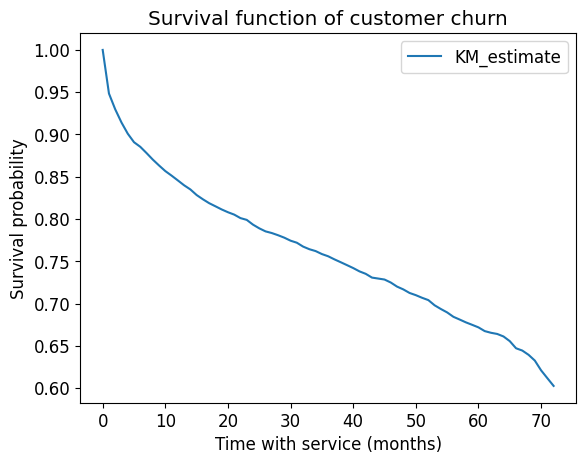
What is this plot telling us?
It shows the probability of survival over time.
For example, after 20 months the probability of survival is ~0.8.
Over time it’s going down.
What’s the average tenure?
np.mean(train_df_surv["tenure"])np.float64(32.6391518364256)What’s the average tenure of the people who churned?
np.mean(train_df_surv.query("Churn == 1.0")["tenure"])np.float64(17.854744525547446)What’s the average tenure of the people who did not churn?
np.mean(train_df_surv.query("Churn == 0.0")["tenure"])np.float64(37.816717791411044)Let’s look at the histogram of number of people who have not churned.
The key point here is that people joined at different times.
plt.figure(figsize=(4, 3))
train_df_surv[train_df_surv["Churn"] == 0]["tenure"].hist(bins=20, grid=False)
plt.xlabel("months");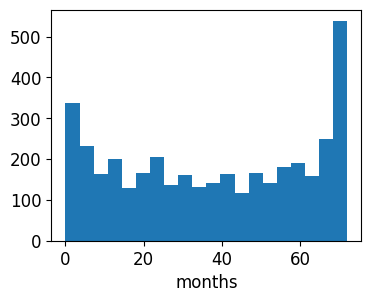
Since the data was collected at a fixed time and these are the people who hadn’t yet churned, those with larger
tenurevalues here must have joined earlier.
Lifelines can also give us some “error bars”:
kmf.plot_survival_function()
plt.title("Survival function of customer churn")
plt.xlabel("Time with service (months)")
plt.ylabel("Survival probability");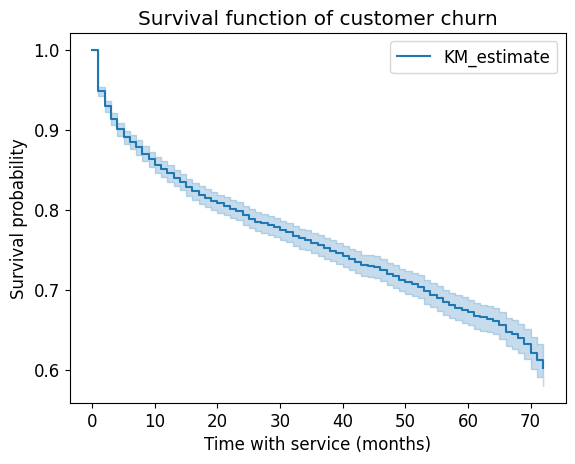
We already have some actionable information here.
The curve drops down fast at the beginning suggesting that people tend to leave early on.
If there would have been a big drop in the curve, it means a bunch of people left at that time (e.g., after a 1-month free trial).
By the way, the original paper by Kaplan and Meier has been cited over 68000 times!
We can also create the K-M curve for different subgroups:
T = train_df_surv["tenure"]
E = train_df_surv["Churn"]
senior = train_df_surv["SeniorCitizen"] == 1
ax = plt.subplot(111)
kmf.fit(T[senior], event_observed=E[senior], label="Senior Citizens")
kmf.plot_survival_function(ax=ax)
kmf.fit(T[~senior], event_observed=E[~senior], label="Non-Senior Citizens")
kmf.plot_survival_function(ax=ax)
plt.ylim(0, 1)
plt.xlabel("Time with service (months)")
plt.ylabel("Survival probability");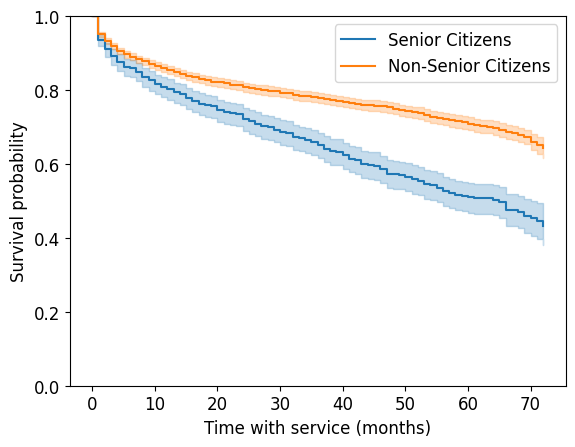
It looks like senior citizens churn more quickly than others.
This is quite useful!
Cox proportional hazards model
We haven’t been incorporating other features in the model so far.
The Cox proportional hazards model is a commonly used model that allows us to interpret how features influence a censored tenure/duration.
You can think of it like linear regression for survival analysis: we will get a coefficient for each feature that tells us how it influences survival.
It makes some strong assumptions (the proportional hazards assumption) that may not be true, but we won’t go into this here.
The proportional hazard model works multiplicatively, like linear regression with log-transformed targets.
cph = lifelines.CoxPHFitter()
# cph.fit(train_df_surv, duration_col="tenure", event_col="Churn");
Ok, going to this URL, it seems the easiest solution is to add a penalizer.
FYI this is related to switching from
LinearRegressiontoRidge.Adding
drop='first'on our OHE might have helped with this.(For 340 folks: we’re adding regularization;
lifelinesadds both L1 and L2 regularization, aka elastic net)
cph = lifelines.CoxPHFitter(penalizer=0.1)
cph.fit(train_df_surv, duration_col="tenure", event_col="Churn");
/Users/firasm/miniforge3/envs/cpsc330/lib/python3.13/site-packages/lifelines/fitters/coxph_fitter.py:1217: DeprecationWarning: datetime.datetime.utcnow() is deprecated and scheduled for removal in a future version. Use timezone-aware objects to represent datetimes in UTC: datetime.datetime.now(datetime.UTC).
self._time_fit_was_called = datetime.utcnow().strftime("%Y-%m-%d %H:%M:%S") + " UTC"
We can look at the coefficients learned by the model and start interpreting them!
cph_params = pd.DataFrame(cph.params_).sort_values(by="coef", ascending=False)
cph_paramsHow to interpret these coefficients In the Cox Proportional Hazards model?
A positive coefficient indicates that higher values of the feature are associated with higher hazard rates, meaning they are associated with worse survival.
A negative coefficient indicates that higher values of the feature are associated with lower hazard rates, meaning they are associated with better survival.
In our example, it looks like
Contract_Month-to-monthhas a positive coefficientIf the contract is month-to-month, it leads to more churn worse survival (😔)
In our example, it looks like
Contract_Two yearhas a negative coefficientIf the contract is two-year contract, it leads to less churn better survival (😊)
This makes sense!!!
# cph.baseline_hazard_ # baseline hazardcph.summaryCould we have gotten this type of information out of sklearn?
Yes, let’s try it out!
But remember that using survival analysis approach is more appropriate for such problems.
y_train.head()6464 No
5707 No
3442 No
3932 Yes
6124 No
Name: Churn, dtype: objectX_train.drop(columns=["tenure"]).head()I’m redefining feature types and our preprocessor for our sanity.
numeric_features = ["MonthlyCharges"]
drop_features = ["customerID", "tenure", "TotalCharges"]
passthrough_features = ["SeniorCitizen"]
target_column = ["Churn"]
# the rest are categorical
categorical_features = list(
    set(train_df.columns)
    - set(numeric_features)
    - set(passthrough_features)
    - set(drop_features)
    - set(target_column)
)
preprocessor = make_column_transformer(
(
make_pipeline(SimpleImputer(strategy="median"), StandardScaler()),
numeric_features,
),
(OneHotEncoder(handle_unknown="ignore"), categorical_features),
("passthrough", passthrough_features),
("drop", drop_features),
verbose_feature_names_out=False
)preprocessor.fit(X_train);new_columns = preprocessor.get_feature_names_out()lr = make_pipeline(preprocessor, LogisticRegression(max_iter=1000))
lr.fit(X_train, y_train)
lr_coefs = pd.DataFrame(
data=np.squeeze(lr[1].coef_), index=new_columns, columns=["Coefficient"]
)lr_coefs.sort_values(by="Coefficient", ascending=False)There is some agreement, which is good.
But our survival model is much more useful.
Not to mention more correct.
One thing we get with
lifelinesis confidence intervals on the coefficients:
plt.figure(figsize=(10, 12))
cph.plot();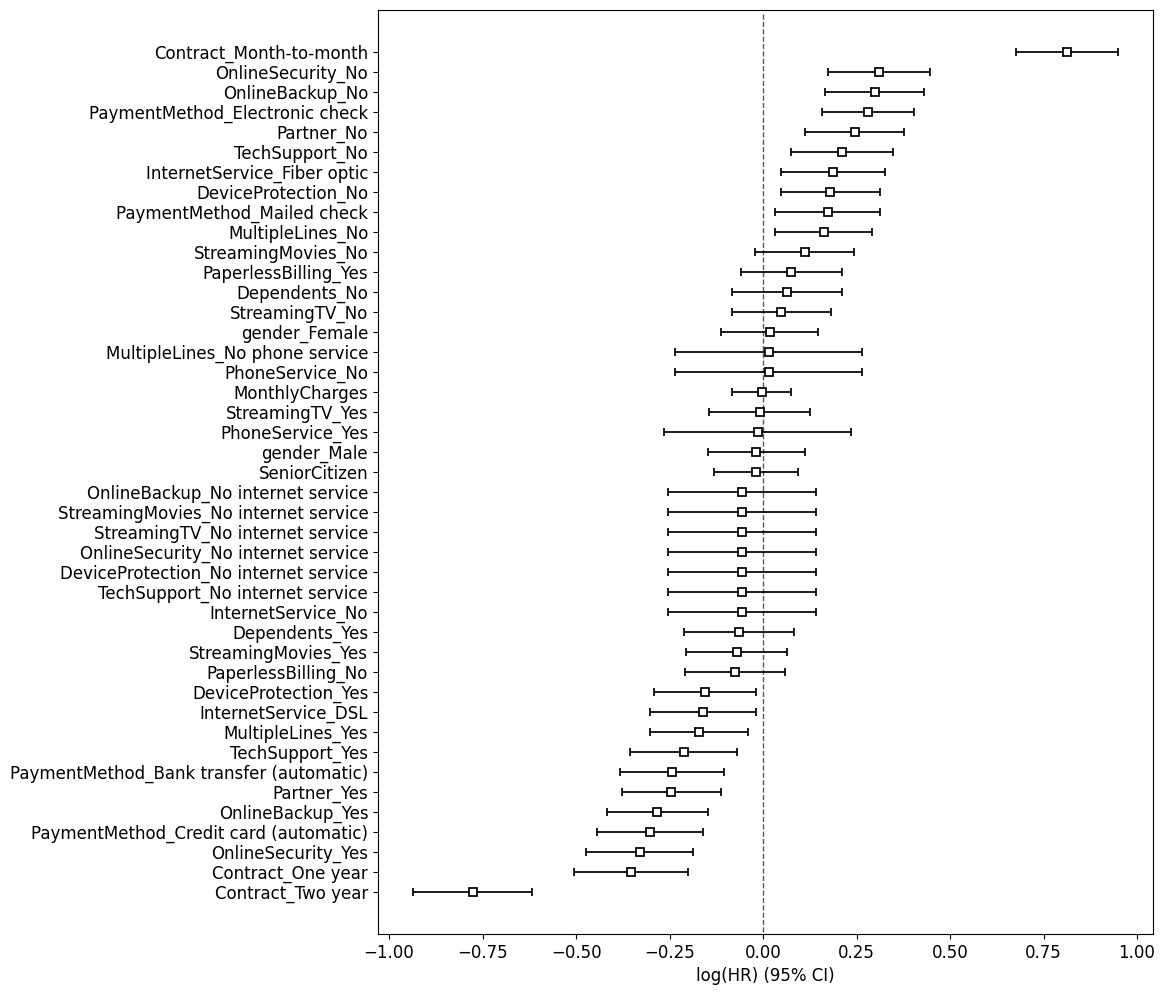
(We could probably get the same for logistic regression if using
statsmodelsinstead of sklearn.)However, in general, I would be careful with all of this.
Ideally we would have more statistical training when using
lifelines- there is a lot that can go wrong.It comes with various diagnostics as well.
But I think it’s very useful to know about survival analysis and the availability of software to deal with it.
Oh, and there are lots of other nice plots.
Survival plots
Let’s look at the survival plots for the people with
two-year contract (Contract_Two year = 1) and
people without two-year contract (Contract_Two year = 0)
As expected, the former survive longer.
cph.plot_partial_effects_on_outcome("Contract_Two year", [0, 1])
plt.xlabel("Time with service (months)")
plt.ylabel("Survival probability");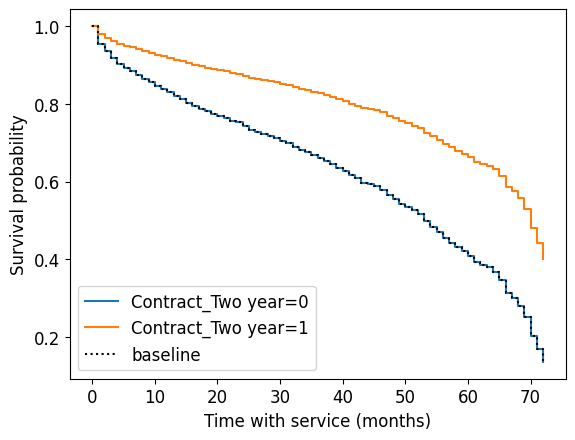
Now let’s look at the survival plots for the people with different MonthlyCharges.
cph.plot_partial_effects_on_outcome("MonthlyCharges", [10, 100, 1000, 10_000])
plt.xlabel("Time with service (months)")
plt.ylabel("Survival probability");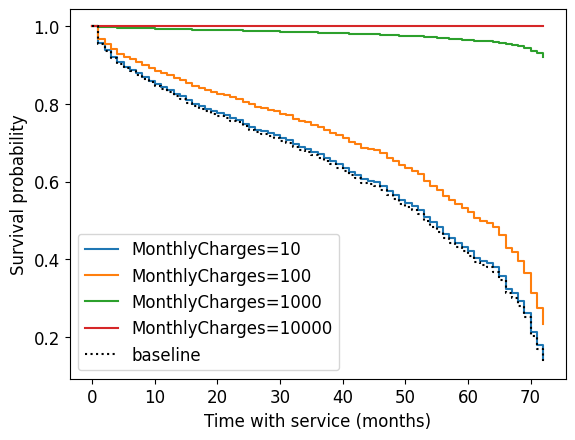
That’s the thing with linear models, they can’t stop the growth.
We have a negative coefficient associated with
MonthlyCharges
cph_params.loc["MonthlyCharges"]coef -0.003185
Name: MonthlyCharges, dtype: float64If your monthly charges are huge, it takes this to the extreme and thinks you’ll basically never churn.
Prediction
We can use survival analysis to make predictions as well.
Here is the expected number of months to churn for the first 5 customers in the test set:
test_X = test_df_surv.drop(columns=["tenure", "Churn"])How long each non-churned customer is likely to stay according to the model assuming that they just joined right now?
cph.predict_expectation(test_X).head() # assumes they just joined right now941 35.206724
1404 69.023086
5515 68.608565
3684 27.565062
7017 67.890933
dtype: float64Survival curves for first 5 customers in the test set:
cph.predict_survival_function(test_X[:5]).plot()
plt.xlabel("Time with service (months)")
plt.ylabel("Survival probability");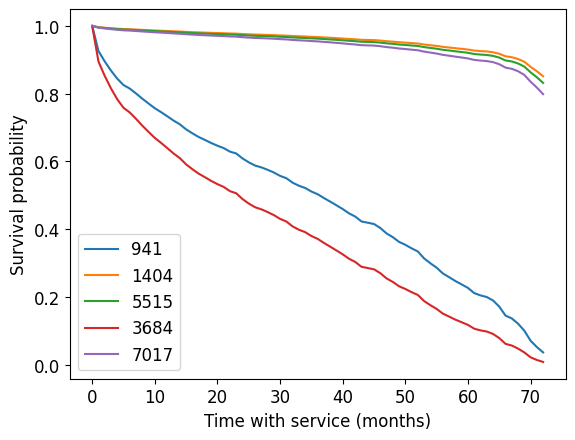
From predict_survival_function documentation:
Predict the survival function for individuals, given their covariates. This assumes that the individual just entered the study (that is, we do not condition on how long they have already lived for.)
So these curves are “starting now”.
(Optional) Given customer has been here months, what’s the outlook?
There’s no probability prerequisite for this course, so this is optional material.
But you can do some interesting stuff here with conditional probabilities.
“Given that a customer has been here 5 months, what’s the outlook?”
It will be different than for a new customer.
Thus, we might still want to predict for the non-churned customers in the training set!
Not something we really thought about with our traditional supervised learning.
Let’s get the customers who have not churned yet.
train_df_surv_not_churned = train_df_surv[train_df_surv["Churn"] == 0]We can condition on the person having been around for 20 months.
cph.predict_survival_function(train_df_surv_not_churned[:1], conditional_after=20)plt.figure()
cph.predict_survival_function(train_df_surv_not_churned[:1]).plot(ax=plt.gca())
preds = cph.predict_survival_function(
train_df_surv_not_churned[:1], conditional_after=20
)
plt.plot(preds.index[20:], preds.values[:-20])
plt.xlabel("Time with service (months)")
plt.ylabel("Survival probability")
plt.legend(["Starting now", "Given 20 more months of service"])
plt.ylim([0, 1])
plt.xlim([1, 50]);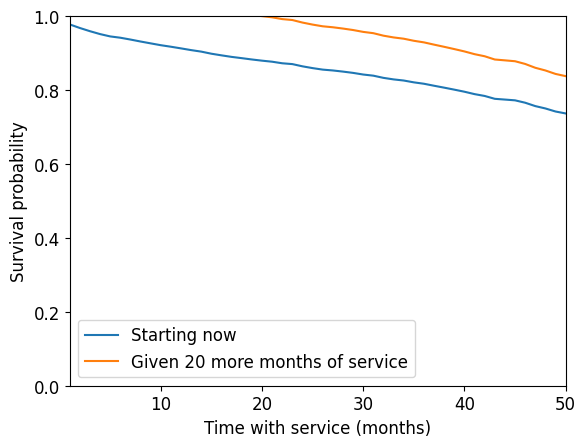
Look at how the survival function (and expected lifetime) is much longer given that the customer has already lasted 20 months.
How long each non-churned customer is likely to stay according to the model assuming that they have been here for the tenure time?
So, we can set this to their actual tenure so far to get a prediciton of what will happen going forward:
cph.predict_survival_function(
    train_df_surv_not_churned[:1],
    conditional_after=train_df_surv_not_churned[:1]["tenure"],
).plot()
plt.xlabel("Time into the future (months)")
plt.ylabel("Survival probability")
plt.ylim([0, 1])
plt.xlim([0, 20]);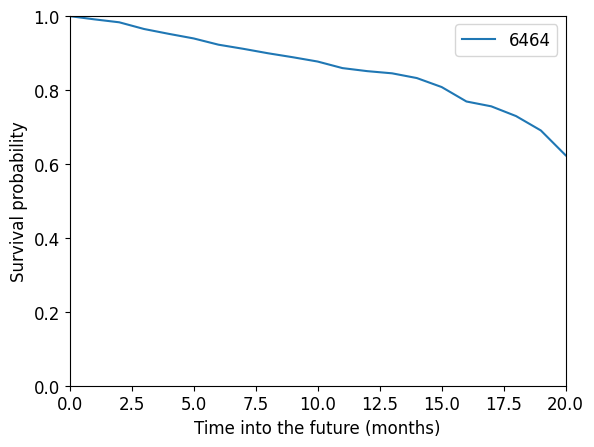
Another useful application: you could ask what is the customer lifetime value.
Basically, how much money do you expect to make off this customer between now and when they churn?
With regular supervised learning, tenure was a feature and we could only predict whether or not they had churned by then.
(Optional) Evaluation
By default score returns “partial log likelihood”:
cph.score(train_df_surv)np.float64(-1.8641864337292489)cph.score(test_df_surv)np.float64(-1.7277854625841886)We can look at the “concordance index” which is more interpretable:
cph.concordance_index_np.float64(0.8625888648969532)cph.score(train_df_surv, scoring_method="concordance_index")np.float64(0.8625888648969532)cph.score(test_df_surv, scoring_method="concordance_index")np.float64(0.8546143543902771)From the documentation here:
Another censoring-sensitive measure is the concordance-index, also known as the c-index. This measure evaluates the accuracy of the ranking of predicted time. It is in fact a generalization of AUC, another common loss function, and is interpreted similarly:
0.5 is the expected result from random predictions,
1.0 is perfect concordance and,
0.0 is perfect anti-concordance (multiply predictions with -1 to get 1.0)
Here is an excellent introduction & description of the c-index for new users.
cph.log_likelihood_ratio_test()cph.check_assumptions(train_df_surv)The ``p_value_threshold`` is set at 0.01. Even under the null hypothesis of no violations, some
covariates will be below the threshold by chance. This is compounded when there are many covariates.
Similarly, when there are lots of observations, even minor deviances from the proportional hazard
assumption will be flagged.
With that in mind, it's best to use a combination of statistical tests and visual tests to determine
the most serious violations. Produce visual plots using ``check_assumptions(..., show_plots=True)``
and looking for non-constant lines. See link [A] below for a full example.
1. Variable 'Contract_One year' failed the non-proportional test: p-value is 0.0001.

   Advice: with so few unique values (only 2), you can include `strata=['Contract_One year', ...]`
in the call in `.fit`. See documentation in link [E] below.

2. Variable 'Contract_Two year' failed the non-proportional test: p-value is 0.0029.

   Advice: with so few unique values (only 2), you can include `strata=['Contract_Two year', ...]`
in the call in `.fit`. See documentation in link [E] below.

---
[A]  https://lifelines.readthedocs.io/en/latest/jupyter_notebooks/Proportional%20hazard%20assumption.html
[B]  https://lifelines.readthedocs.io/en/latest/jupyter_notebooks/Proportional%20hazard%20assumption.html#Bin-variable-and-stratify-on-it
[C]  https://lifelines.readthedocs.io/en/latest/jupyter_notebooks/Proportional%20hazard%20assumption.html#Introduce-time-varying-covariates
[D]  https://lifelines.readthedocs.io/en/latest/jupyter_notebooks/Proportional%20hazard%20assumption.html#Modify-the-functional-form
[E]  https://lifelines.readthedocs.io/en/latest/jupyter_notebooks/Proportional%20hazard%20assumption.html#Stratification
[]Other approaches / what did we not cover?
There are many other approaches to modelling in survival analysis:
Time-varying proportional hazards.
What if some of the features change over time, e.g. plan type, number of lines, etc.
Approaches based on deep learning, e.g. the pysurvival package.
Random survival forests.
And more...
Types of censoring
There are also various types and sub-types of censoring we didn’t cover:
What we did today is called “right censoring”
Sub-types within right censoring
Did everyone join at the same time?
Other reasons the data might be censored at random times, e.g. the person died?
Left censoring
Interval censoring
Summary
Censoring and incorrect approaches to handling it
Throw away people who haven’t churned
Assume everyone churns today
Predicting tenure vs. churned
Survival analysis encompasses both of these, and deals with censoring
And it can make rich and interesting predictions!
KM model -> doesn’t look at features
CPH model -> like linear regression, does look at the features
References
Some people working with this same dataset:
https://
medium .com /@zachary .james .angell /applying -survival -analysis -to -customer -churn -40b5a809b05a https://
towardsdatascience .com /churn -prediction -and -prevention -in -python -2d454e5fd9a5 (Cox) https://
towardsdatascience .com /survival -analysis -in -python -a -model -for -customer -churn -e737c5242822 https://
towardsdatascience .com /survival -analysis -intuition -implementation -in -python -504fde4fcf8e
lifelines documentation: