Lecture 6: sklearn ColumnTransformer and Text Features
UBC 2025-26
Imports, Announcements, and LO
Imports
import os
import sys
import time

import matplotlib.pyplot as plt

%matplotlib inline
import numpy as np
import pandas as pd
from IPython.display import HTML

sys.path.append(os.path.join(os.path.abspath(".."), "code"))

import mglearn
from IPython.display import display
from plotting_functions import *

# Classifiers and regressors
from sklearn.dummy import DummyClassifier, DummyRegressor

# Preprocessing and pipeline
from sklearn.impute import SimpleImputer

# train test split and cross validation
from sklearn.model_selection import cross_val_score, cross_validate, train_test_split
from sklearn.neighbors import KNeighborsClassifier, KNeighborsRegressor
from sklearn.pipeline import Pipeline
from sklearn.preprocessing import (
    MinMaxScaler,
    OneHotEncoder,
    OrdinalEncoder,
    StandardScaler,
)
from sklearn.svm import SVC
from sklearn.tree import DecisionTreeClassifier
from utils import *

%matplotlib inline
pd.set_option("display.max_colwidth", 200)
DATA_DIR = "../data/"
Learning outcomes
By the end of this lesson, you will be able to:
Use
ColumnTransformerto build all our transformations together into one object and use it withsklearnpipelines;Define
ColumnTransformerwhere transformers contain more than one steps;Explain
handle_unknown="ignore"hyperparameter ofscikit-learn’sOneHotEncoder;Explain
drop="if_binary"argument ofOneHotEncoder;Identify when it’s appropriate to apply ordinal encoding vs one-hot encoding;
Explain strategies to deal with categorical variables with too many categories;
Explain why text data needs a different treatment than categorical variables;
Use
scikit-learn’sCountVectorizerto encode text data;Explain different hyperparameters of
CountVectorizer.Incorporate text features in a machine learning pipeline
sklearn’s ColumnTransformer
In most applications, some features are categorical, some are continuous, some are binary, and some are ordinal.
When we want to develop supervised machine learning pipelines on real-world datasets, very often we want to apply different transformation on different columns.
Enter
sklearn’sColumnTransformer!!
Let’s look at a toy example:
df = pd.read_csv(DATA_DIR + "quiz2-grade-toy-col-transformer.csv")
dfdf.info()<class 'pandas.core.frame.DataFrame'>
RangeIndex: 21 entries, 0 to 20
Data columns (total 11 columns):
# Column Non-Null Count Dtype
--- ------ -------------- -----
0 enjoy_course 21 non-null object
1 ml_experience 21 non-null int64
2 major 21 non-null object
3 class_attendance 21 non-null object
4 university_years 21 non-null int64
5 lab1 21 non-null int64
6 lab2 19 non-null float64
7 lab3 21 non-null int64
8 lab4 21 non-null int64
9 quiz1 21 non-null int64
10 quiz2 21 non-null object
dtypes: float64(1), int64(6), object(4)
memory usage: 1.9+ KB
Transformations on the toy data
df.head()Scaling on numeric features
One-hot encoding on the categorical feature
majorand binary featureenjoy_classOrdinal encoding on the ordinal feature
class_attendanceImputation on the
lab2featureNone on the
ml_experiencefeature
ColumnTransformer example
Data
X = df.drop(columns=["quiz2"])
y = df["quiz2"]
X.columns
Index(['enjoy_course', 'ml_experience', 'major', 'class_attendance',
'university_years', 'lab1', 'lab2', 'lab3', 'lab4', 'quiz1'],
dtype='object')Identify the transformations we want to apply
X.head()numeric_feats = ["university_years", "lab1", "lab3", "lab4", "quiz1"] # apply scaling
categorical_feats = ["major"] # apply one-hot encoding
passthrough_feats = ["ml_experience"] # do not apply any transformation
drop_feats = [
"lab2",
"class_attendance",
"enjoy_course",
] # do not include these features in modelingFor simplicity, let’s only focus on scaling and one-hot encoding first.
Create a column transformer
Each transformation is specified by a name, a transformer object, and the columns this transformer should be applied to.
from sklearn.compose import ColumnTransformerct = ColumnTransformer(
[
("scaling", StandardScaler(), numeric_feats),
("onehot", OneHotEncoder(sparse_output=False), categorical_feats),
]
)Convenient make_column_transformer syntax
Similar to
make_pipelinesyntax, there is convenientmake_column_transformersyntax.The syntax automatically names each step based on its class.
We’ll be mostly using this syntax.
from sklearn.compose import make_column_transformer

ct = make_column_transformer(
    (StandardScaler(), numeric_feats),  # scaling on numeric features
    ("passthrough", passthrough_feats),  # no transformations on the binary features
    (OneHotEncoder(), categorical_feats),  # OHE on categorical features
    ("drop", drop_feats),  # drop the drop features
)cttransformed = ct.fit_transform(X)When we
fit_transform, each transformer is applied to the specified columns and the result of the transformations are concatenated horizontally.A big advantage here is that we build all our transformations together into one object, and that way we’re sure we do the same operations to all splits of the data.
Otherwise we might, for example, do the OHE on both train and test but forget to scale the test data.
Let’s examine the transformed data
type(transformed[:2])numpy.ndarraytransformedarray([[-0.09345386, 0.3589134 , -0.21733442, 0.36269995, 0.84002795,
1. , 0. , 1. , 0. , 0. ,
0. , 0. , 0. , 0. ],
[-1.07471942, 0.59082668, -0.61420598, -0.85597188, 0.71219761,
1. , 0. , 0. , 0. , 0. ,
0. , 1. , 0. , 0. ],
[-0.09345386, -1.26447953, -0.31655231, -1.31297381, -0.69393613,
0. , 0. , 0. , 0. , 0. ,
1. , 0. , 0. , 0. ],
[-0.09345386, 0.24295676, 0.57640869, 0.36269995, 0.45653693,
0. , 0. , 0. , 0. , 0. ,
1. , 0. , 0. , 0. ],
[ 0.8878117 , -1.38043616, 0.37797291, 0.51503393, -0.05478443,
0. , 0. , 0. , 0. , 0. ,
0. , 0. , 0. , 1. ],
[ 1.86907725, -2.19213263, -1.80482065, -2.22697768, -1.84440919,
1. , 0. , 0. , 1. , 0. ,
0. , 0. , 0. , 0. ],
[ 0.8878117 , -1.03256625, 0.27875502, -0.09430199, 0.71219761,
1. , 0. , 1. , 0. , 0. ,
0. , 0. , 0. , 0. ],
[-0.09345386, 0.70678332, -1.70560276, -1.46530779, -1.33308783,
0. , 0. , 0. , 0. , 0. ,
0. , 1. , 0. , 0. ],
[-1.07471942, 0.93869659, 0.77484447, -1.00830586, -0.69393613,
0. , 0. , 0. , 0. , 1. ,
0. , 0. , 0. , 0. ],
[ 0.8878117 , 0.70678332, 0.77484447, 0.81970188, -0.05478443,
1. , 0. , 0. , 0. , 0. ,
1. , 0. , 0. , 0. ],
[-0.09345386, 1.05465323, 0.87406235, 0.97203586, -0.94959681,
0. , 0. , 0. , 0. , 0. ,
0. , 0. , 0. , 1. ],
[-2.05598498, 0.70678332, 0.67562658, 0.51503393, -0.05478443,
1. , 0. , 0. , 0. , 0. ,
0. , 0. , 1. , 0. ],
[-1.07471942, 1.05465323, 0.97328024, 1.58137177, 1.86267067,
1. , 0. , 0. , 0. , 0. ,
0. , 0. , 1. , 0. ],
[ 0.8878117 , 0.70678332, 0.97328024, 0.97203586, 1.86267067,
0. , 0. , 0. , 0. , 0. ,
0. , 1. , 0. , 0. ],
[-0.09345386, 0.70678332, 0.67562658, 0.97203586, -1.97223953,
0. , 0. , 0. , 0. , 0. ,
1. , 0. , 0. , 0. ],
[-0.09345386, 0.3589134 , -1.90403853, 0.81970188, 0.84002795,
1. , 0. , 1. , 0. , 0. ,
0. , 0. , 0. , 0. ],
[ 1.86907725, -1.61234944, 0.67562658, -0.39896994, -0.05478443,
0. , 0. , 1. , 0. , 0. ,
0. , 0. , 0. , 0. ],
[-0.09345386, -0.33682642, -2.10247431, -0.39896994, 0.20087625,
1. , 0. , 0. , 1. , 0. ,
0. , 0. , 0. , 0. ],
[-1.07471942, 0.24295676, 0.37797291, -0.09430199, -0.43827545,
1. , 1. , 0. , 0. , 0. ,
0. , 0. , 0. , 0. ],
[-1.07471942, -1.38043616, 0.08031924, -1.16063983, 0.45653693,
0. , 0. , 0. , 0. , 0. ,
0. , 0. , 0. , 1. ],
[ 0.8878117 , 0.82273995, 0.57640869, 1.12436984, 0.20087625,
1. , 0. , 0. , 0. , 1. ,
0. , 0. , 0. , 0. ]])Viewing the transformed data as a dataframe
How can we view our transformed data as a dataframe?
We are adding more columns.
So the original columns won’t directly map to the transformed data.
Let’s create column names for the transformed data.
ct.named_transformers_{'standardscaler': StandardScaler(),
'passthrough': FunctionTransformer(accept_sparse=True, check_inverse=False,
feature_names_out='one-to-one'),
'onehotencoder': OneHotEncoder(),
'drop': 'drop'}column_names = (
numeric_feats
+ passthrough_feats
+ ct.named_transformers_["onehotencoder"].get_feature_names_out().tolist()
)
column_names['university_years',
'lab1',
'lab3',
'lab4',
'quiz1',
'ml_experience',
'major_Biology',
'major_Computer Science',
'major_Economics',
'major_Linguistics',
'major_Mathematics',
'major_Mechanical Engineering',
'major_Physics',
'major_Psychology']With scikit-learn 1.0 and later, you can directly call get_feature_names_out on a fitted ColumnTransformer (including those created with make_column_transformer) to get the output feature names. The names typically include the original feature names, and when applicable, category labels or transformer prefixes (e.g., nehotencoder__major_Computer Science).
column_names = ct.get_feature_names_out()
column_names
array(['standardscaler__university_years', 'standardscaler__lab1',
'standardscaler__lab3', 'standardscaler__lab4',
'standardscaler__quiz1', 'passthrough__ml_experience',
'onehotencoder__major_Biology',
'onehotencoder__major_Computer Science',
'onehotencoder__major_Economics',
'onehotencoder__major_Linguistics',
'onehotencoder__major_Mathematics',
'onehotencoder__major_Mechanical Engineering',
'onehotencoder__major_Physics', 'onehotencoder__major_Psychology'],
dtype=object)pd.DataFrame(transformed, columns=column_names)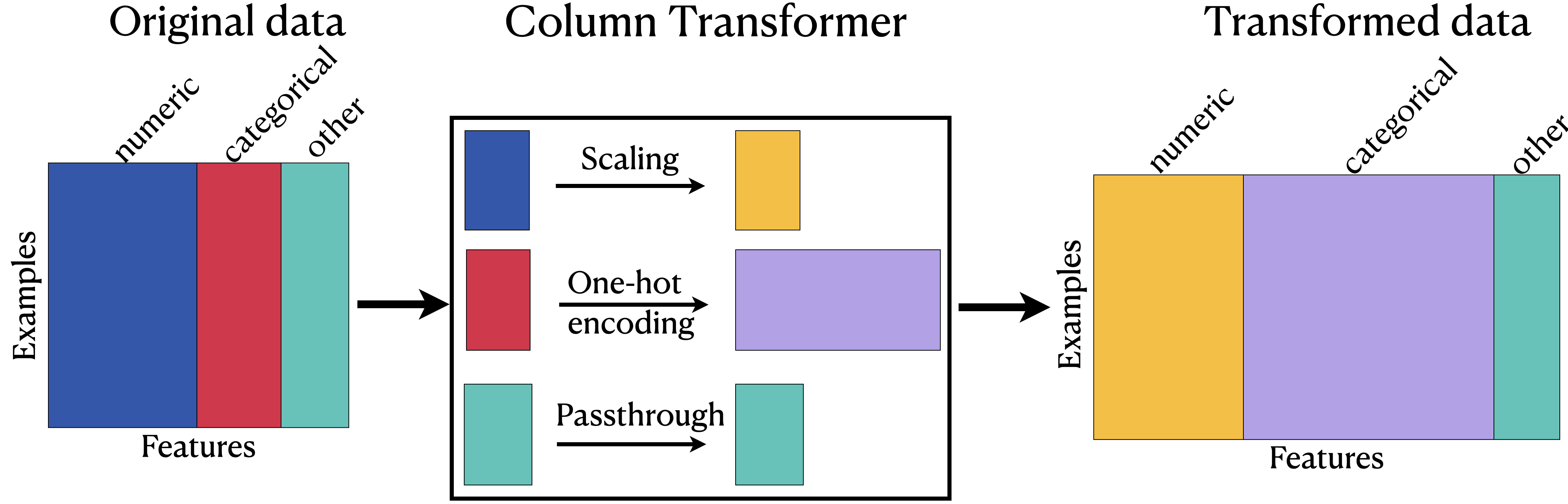
Training models with transformed data
We can now pass the
ColumnTransformerobject as a step in a pipeline.
pipe = make_pipeline(ct, SVC())
pipe.fit(X, y)
pipe.predict(X)
array(['A+', 'not A+', 'not A+', 'A+', 'A+', 'not A+', 'A+', 'not A+',
'not A+', 'A+', 'A+', 'A+', 'A+', 'A+', 'not A+', 'not A+', 'A+',
'not A+', 'not A+', 'not A+', 'A+'], dtype=object)pipe❓❓ Questions for you
(iClicker) Exercise 6.1
Select all of the following statements which are TRUE.
You could carry out cross-validation by passing a
ColumnTransformerobject tocross_validate.After applying column transformer, the order of the columns in the transformed data has to be the same as the order of the columns in the original data.
After applying a column transformer, the transformed data is always going to be of different shape than the original data.
When you call
fit_transformon aColumnTransformerobject, you get a numpy ndarray.
More on feature transformations
sklearn set_config
With multiple transformations in a column transformer, it can get tricky to keep track of everything happening inside it.
We can use
set_configto display a diagram of this.
from sklearn import set_config

set_config(display="diagram")ctprint(ct)ColumnTransformer(transformers=[('standardscaler', StandardScaler(),
['university_years', 'lab1', 'lab3', 'lab4',
'quiz1']),
('passthrough', 'passthrough',
['ml_experience']),
('onehotencoder', OneHotEncoder(), ['major']),
('drop', 'drop',
['lab2', 'class_attendance', 'enjoy_course'])])
Multiple transformations in a transformer
Recall that
lab2has missing values.
X.head(10)So we would like to apply more than one transformations on it: imputation and scaling.
We can treat
lab2separately, but we can also include it intonumeric_featsand apply both transformations on all numeric columns.
numeric_feats = [
    "university_years",
    "lab1",
    "lab2",
    "lab3",
    "lab4",
    "quiz1",
]  # apply scaling
categorical_feats = ["major"]  # apply one-hot encoding
passthrough_feats = ["ml_experience"]  # do not apply any transformation
drop_feats = ["class_attendance", "enjoy_course"]
To apply more than one transformations we can define a pipeline inside a column transformer to chain different transformations.
ct = make_column_transformer(
    (
        make_pipeline(SimpleImputer(), StandardScaler()),
        numeric_feats,
    ),  # scaling on numeric features
    ("passthrough", passthrough_feats),  # no transformations on the binary features
    (OneHotEncoder(), categorical_feats),  # OHE on categorical features
    ("drop", drop_feats),  # drop the drop features
)ctX_transformed = ct.fit_transform(X)How to get feature names of the transformed data?
column_names = ct.get_feature_names_out()
column_names
array(['pipeline__university_years', 'pipeline__lab1', 'pipeline__lab2',
'pipeline__lab3', 'pipeline__lab4', 'pipeline__quiz1',
'passthrough__ml_experience', 'onehotencoder__major_Biology',
'onehotencoder__major_Computer Science',
'onehotencoder__major_Economics',
'onehotencoder__major_Linguistics',
'onehotencoder__major_Mathematics',
'onehotencoder__major_Mechanical Engineering',
'onehotencoder__major_Physics', 'onehotencoder__major_Psychology'],
dtype=object)pd.DataFrame(X_transformed, columns=column_names)Incorporating ordinal feature class_attendance
The
class_attendancecolumn is different than themajorcolumn in that there is some ordering of the values.Excellent > Good > Average > poor
X.head()Let’s try applying OrdinalEncoder on this column.
X_toy = X[["class_attendance"]]
enc = OrdinalEncoder()
enc.fit(X_toy)
X_toy_ord = enc.transform(X_toy)
df = pd.DataFrame(
    data=X_toy_ord,
    columns=["class_attendance_enc"],
    index=X_toy.index,
)
pd.concat([X_toy, df], axis=1).head(10)What’s the problem here?
The encoder doesn’t know the order.
We can examine unique categories manually, order them based on our intuitions, and then provide this human knowledge to the transformer.
What are the unique categories of class_attendance?
X_toy["class_attendance"].unique()array(['Excellent', 'Average', 'Poor', 'Good'], dtype=object)Let’s order them manually.
class_attendance_levels = ["Poor", "Average", "Good", "Excellent"]Let’s make sure that we have included all categories in our manual ordering.
assert set(class_attendance_levels) == set(X_toy["class_attendance"].unique())oe = OrdinalEncoder(categories=[class_attendance_levels], dtype=int)
oe.fit(X_toy[["class_attendance"]])
ca_transformed = oe.transform(X_toy[["class_attendance"]])
df = pd.DataFrame(
data=ca_transformed, columns=["class_attendance_enc"], index=X_toy.index
)
print(oe.categories_)
pd.concat([X_toy, df], axis=1).head(10)[array(['Poor', 'Average', 'Good', 'Excellent'], dtype=object)]
The encoded categories are looking better now!
More than one ordinal columns?
We can pass the manually ordered categories when we create an
OrdinalEncoderobject as a list of lists.If you have more than one ordinal columns
manually create a list of ordered categories for each column
pass a list of lists to
OrdinalEncoder, where each inner list corresponds to manually created list of ordered categories for a corresponding ordinal column.
Now let’s incorporate ordinal encoding of class_attendance in our column transformer.
Xnumeric_feats = [
"university_years",
"lab1",
"lab2",
"lab3",
"lab4",
"quiz1",
] # apply scaling
categorical_feats = ["major"] # apply one-hot encoding
ordinal_feats = ["class_attendance"] # apply ordinal encoding
passthrough_feats = ["ml_experience"] # do not apply any transformation
drop_feats = ["enjoy_course"] # do not include these featuresct = make_column_transformer(
(
make_pipeline(SimpleImputer(), StandardScaler()),
numeric_feats,
), # scaling on numeric features
(
OrdinalEncoder(categories=[class_attendance_levels], dtype=int),
ordinal_feats,
), # Ordinal encoding on ordinal features
("passthrough", passthrough_feats), # no transformations on the binary features
(OneHotEncoder(), categorical_feats), # OHE on categorical features
("drop", drop_feats), # drop the drop features
)ctX_transformed = ct.fit_transform(X)column_names = ct.get_feature_names_out()pd.DataFrame(X_transformed, columns=column_names)Dealing with unknown categories
Let’s create a pipeline with the column transformer and pass it to cross_validate.
pipe = make_pipeline(ct, SVC())scores = cross_validate(pipe, X, y, return_train_score=True)
pd.DataFrame(scores)/Users/kvarada/miniforge3/envs/cpsc330/lib/python3.13/site-packages/sklearn/model_selection/_validation.py:953: UserWarning: Scoring failed. The score on this train-test partition for these parameters will be set to nan. Details:
Traceback (most recent call last):
File "/Users/kvarada/miniforge3/envs/cpsc330/lib/python3.13/site-packages/sklearn/model_selection/_validation.py", line 942, in _score
scores = scorer(estimator, X_test, y_test, **score_params)
File "/Users/kvarada/miniforge3/envs/cpsc330/lib/python3.13/site-packages/sklearn/metrics/_scorer.py", line 492, in __call__
return estimator.score(*args, **kwargs)
~~~~~~~~~~~~~~~^^^^^^^^^^^^^^^^^
File "/Users/kvarada/miniforge3/envs/cpsc330/lib/python3.13/site-packages/sklearn/pipeline.py", line 1185, in score
Xt = transform.transform(Xt)
File "/Users/kvarada/miniforge3/envs/cpsc330/lib/python3.13/site-packages/sklearn/utils/_set_output.py", line 316, in wrapped
data_to_wrap = f(self, X, *args, **kwargs)
File "/Users/kvarada/miniforge3/envs/cpsc330/lib/python3.13/site-packages/sklearn/compose/_column_transformer.py", line 1096, in transform
Xs = self._call_func_on_transformers(
X,
...<3 lines>...
routed_params=routed_params,
)
File "/Users/kvarada/miniforge3/envs/cpsc330/lib/python3.13/site-packages/sklearn/compose/_column_transformer.py", line 897, in _call_func_on_transformers
return Parallel(n_jobs=self.n_jobs)(jobs)
~~~~~~~~~~~~~~~~~~~~~~~~~~~~^^^^^^
File "/Users/kvarada/miniforge3/envs/cpsc330/lib/python3.13/site-packages/sklearn/utils/parallel.py", line 82, in __call__
return super().__call__(iterable_with_config_and_warning_filters)
~~~~~~~~~~~~~~~~^^^^^^^^^^^^^^^^^^^^^^^^^^^^^^^^^^^^^^^^^^
File "/Users/kvarada/miniforge3/envs/cpsc330/lib/python3.13/site-packages/joblib/parallel.py", line 1986, in __call__
return output if self.return_generator else list(output)
~~~~^^^^^^^^
File "/Users/kvarada/miniforge3/envs/cpsc330/lib/python3.13/site-packages/joblib/parallel.py", line 1914, in _get_sequential_output
res = func(*args, **kwargs)
File "/Users/kvarada/miniforge3/envs/cpsc330/lib/python3.13/site-packages/sklearn/utils/parallel.py", line 147, in __call__
return self.function(*args, **kwargs)
~~~~~~~~~~~~~^^^^^^^^^^^^^^^^^
File "/Users/kvarada/miniforge3/envs/cpsc330/lib/python3.13/site-packages/sklearn/pipeline.py", line 1520, in _transform_one
res = transformer.transform(X, **params.transform)
File "/Users/kvarada/miniforge3/envs/cpsc330/lib/python3.13/site-packages/sklearn/utils/_set_output.py", line 316, in wrapped
data_to_wrap = f(self, X, *args, **kwargs)
File "/Users/kvarada/miniforge3/envs/cpsc330/lib/python3.13/site-packages/sklearn/preprocessing/_encoders.py", line 1043, in transform
X_int, X_mask = self._transform(
~~~~~~~~~~~~~~~^
X,
^^
...<2 lines>...
warn_on_unknown=warn_on_unknown,
^^^^^^^^^^^^^^^^^^^^^^^^^^^^^^^^
)
^
File "/Users/kvarada/miniforge3/envs/cpsc330/lib/python3.13/site-packages/sklearn/preprocessing/_encoders.py", line 218, in _transform
raise ValueError(msg)
ValueError: Found unknown categories ['Biology'] in column 0 during transform
warnings.warn(
What’s going on here??
Let’s look at the error message:
ValueError: Found unknown categories ['Biology'] in column 0 during transform
X["major"].value_counts()major
Computer Science 4
Mathematics 4
Mechanical Engineering 3
Psychology 3
Economics 2
Linguistics 2
Physics 2
Biology 1
Name: count, dtype: int64There is only one instance of Biology.
During cross-validation, this is getting put into the validation split.
By default,
OneHotEncoderthrows an error because you might want to know about this.
Simplest fix:
Pass
handle_unknown="ignore"argument toOneHotEncoderIt creates a row with all zeros.
ct = make_column_transformer(
    (
        make_pipeline(SimpleImputer(), StandardScaler()),
        numeric_feats,
    ),  # scaling on numeric features
    (
        OrdinalEncoder(categories=[class_attendance_levels], dtype=int),
        ordinal_feats,
    ),  # Ordinal encoding on ordinal features
    ("passthrough", passthrough_feats),  # no transformations on the binary features
    (
        OneHotEncoder(handle_unknown="ignore"),
        categorical_feats,
    ),  # OHE on categorical features
    ("drop", drop_feats),  # drop the drop features
)ctpipe = make_pipeline(ct, SVC())scores = cross_validate(pipe, X, y, cv=5, return_train_score=True)
pd.DataFrame(scores)With this approach, all unknown categories will be represented with all zeros and cross-validation is running OK now.
Ask yourself the following questions when you work with categorical variables
Do you want this behaviour?
Are you expecting to get many unknown categories? Do you want to be able to distinguish between them?
Cases where it’s OK to break the golden rule
If it’s some fix number of categories. For example, if it’s something like provinces in Canada or majors taught at UBC. We know the categories in advance and this is one of the cases where it might be OK to violate the golden rule and get a list of all possible values for the categorical variable.
Categorical features with only two possible categories
Sometimes you have features with only two possible categories.
If we apply
OheHotEncoderon such columns, it’ll create two columns, which seems wasteful, as we could represent all information in the column in just one column with say 0’s and 1’s with presence of absence of one of the categories.You can pass
drop="if_binary"argument toOneHotEncoderin order to create only one column in such scenario.
X["enjoy_course"].head()0 yes
1 yes
2 yes
3 no
4 yes
Name: enjoy_course, dtype: objectohe_enc = OneHotEncoder(drop="if_binary", dtype=int, sparse_output=False)
ohe_enc.fit(X[["enjoy_course"]])
transformed = ohe_enc.transform(X[["enjoy_course"]])
df = pd.DataFrame(data=transformed, columns=["enjoy_course_enc"], index=X.index)
pd.concat([X[["enjoy_course"]], df], axis=1).head(10)numeric_feats = [
"university_years",
"lab1",
"lab2",
"lab3",
"lab4",
"quiz1",
] # apply scaling
categorical_feats = ["major"] # apply one-hot encoding
ordinal_feats = ["class_attendance"] # apply ordinal encoding
binary_feats = ["enjoy_course"] # apply one-hot encoding with drop="if_binary"
passthrough_feats = ["ml_experience"] # do not apply any transformation
drop_feats = []ct = make_column_transformer(
(
make_pipeline(SimpleImputer(), StandardScaler()),
numeric_feats,
), # scaling on numeric features
(
OrdinalEncoder(categories=[class_attendance_levels], dtype=int),
ordinal_feats,
), # Ordinal encoding on ordinal features
(
OneHotEncoder(drop="if_binary", dtype=int),
binary_feats,
), # OHE on categorical features
("passthrough", passthrough_feats), # no transformations on the binary features
(
OneHotEncoder(handle_unknown="ignore"),
categorical_feats,
), # OHE on categorical features
)ctpipe = make_pipeline(ct, SVC())scores = cross_validate(pipe, X, y, cv=5, return_train_score=True)
pd.DataFrame(scores)Break (5 min)

ColumnTransformer on the California housing dataset
housing_df = pd.read_csv(DATA_DIR + "housing.csv")
train_df, test_df = train_test_split(housing_df, test_size=0.1, random_state=123)

train_df.head()Some column values are mean/median but some are not.
Let’s add some new features to the dataset which could help predicting the target: median_house_value.
train_df = train_df.assign(
    rooms_per_household=train_df["total_rooms"] / train_df["households"]
)
test_df = test_df.assign(
    rooms_per_household=test_df["total_rooms"] / test_df["households"]
)

train_df = train_df.assign(
    bedrooms_per_household=train_df["total_bedrooms"] / train_df["households"]
)
test_df = test_df.assign(
    bedrooms_per_household=test_df["total_bedrooms"] / test_df["households"]
)

train_df = train_df.assign(
    population_per_household=train_df["population"] / train_df["households"]
)
test_df = test_df.assign(
    population_per_household=test_df["population"] / test_df["households"]
)train_df.head()# Let's keep both numeric and categorical columns in the data.
X_train = train_df.drop(columns=["median_house_value", "total_rooms", "total_bedrooms", "population"])
y_train = train_df["median_house_value"]
X_test = test_df.drop(columns=["median_house_value", "total_rooms", "total_bedrooms", "population"])
y_test = test_df["median_house_value"]from sklearn.compose import ColumnTransformer, make_column_transformerX_train.head(10)X_train.columnsIndex(['longitude', 'latitude', 'housing_median_age', 'households',
'median_income', 'ocean_proximity', 'rooms_per_household',
'bedrooms_per_household', 'population_per_household'],
dtype='object')# Identify the categorical and numeric columns
numeric_features = [
"longitude",
"latitude",
"housing_median_age",
"households",
"median_income",
"rooms_per_household",
"bedrooms_per_household",
"population_per_household",
]
categorical_features = ["ocean_proximity"]
target = "median_income"Let’s create a
ColumnTransformerfor our dataset.
X_train.info()<class 'pandas.core.frame.DataFrame'>
Index: 18576 entries, 6051 to 19966
Data columns (total 9 columns):
# Column Non-Null Count Dtype
--- ------ -------------- -----
0 longitude 18576 non-null float64
1 latitude 18576 non-null float64
2 housing_median_age 18576 non-null float64
3 households 18576 non-null float64
4 median_income 18576 non-null float64
5 ocean_proximity 18576 non-null object
6 rooms_per_household 18576 non-null float64
7 bedrooms_per_household 18391 non-null float64
8 population_per_household 18576 non-null float64
dtypes: float64(8), object(1)
memory usage: 1.4+ MB
X_train["ocean_proximity"].value_counts()ocean_proximity
<1H OCEAN 8221
INLAND 5915
NEAR OCEAN 2389
NEAR BAY 2046
ISLAND 5
Name: count, dtype: int64numeric_transformer = make_pipeline(SimpleImputer(strategy="median"), StandardScaler())
categorical_transformer = OneHotEncoder(handle_unknown="ignore")
preprocessor = make_column_transformer(
(numeric_transformer, numeric_features),
(categorical_transformer, categorical_features),
)preprocessorX_train_pp = preprocessor.fit_transform(X_train)When we
fitthe preprocessor, it callsfiton all the transformersWhen we
transformthe preprocessor, it callstransformon all the transformers.
We can get the new names of the columns that were generated by the one-hot encoding:
preprocessorcolumn_names = preprocessor.get_feature_names_out()
column_namesarray(['pipeline__longitude', 'pipeline__latitude',
'pipeline__housing_median_age', 'pipeline__households',
'pipeline__median_income', 'pipeline__rooms_per_household',
'pipeline__bedrooms_per_household',
'pipeline__population_per_household',
'onehotencoder__ocean_proximity_<1H OCEAN',
'onehotencoder__ocean_proximity_INLAND',
'onehotencoder__ocean_proximity_ISLAND',
'onehotencoder__ocean_proximity_NEAR BAY',
'onehotencoder__ocean_proximity_NEAR OCEAN'], dtype=object)Let’s visualize the preprocessed training data as a dataframe.
pd.DataFrame(X_train_pp, columns=column_names)results_dict = {}
dummy = DummyRegressor()
results_dict["dummy"] = mean_std_cross_val_scores(
dummy, X_train, y_train, return_train_score=True
)
pd.DataFrame(results_dict).Tfrom sklearn.svm import SVR
knn_pipe = make_pipeline(preprocessor, KNeighborsRegressor())knn_piperesults_dict["imp + scaling + ohe + KNN"] = mean_std_cross_val_scores(
knn_pipe, X_train, y_train, return_train_score=True
)pd.DataFrame(results_dict).Tsvr_pipe = make_pipeline(preprocessor, SVR())
results_dict["imp + scaling + ohe + SVR (default)"] = mean_std_cross_val_scores(
svr_pipe, X_train, y_train, return_train_score=True
)pd.DataFrame(results_dict).TThe results with scikit-learn’s default SVR hyperparameters are pretty bad.
svr_C_pipe = make_pipeline(preprocessor, SVR(C=10000))
results_dict["imp + scaling + ohe + SVR (C=10000)"] = mean_std_cross_val_scores(
    svr_C_pipe, X_train, y_train, return_train_score=True
)pd.DataFrame(results_dict).TWith a bigger value for C the results are much better. We need to carry out systematic hyperparameter optimization to get better results. (Coming up next week.)
Note that categorical features are different than free text features. Sometimes there are columns containing free text information and we we’ll look at ways to deal with them in the later part of this lecture.
OHE with many categories
Do we have enough data for rare categories to learn anything meaningful?
How about grouping them into bigger categories?
Example: country names into continents such as “South America” or “Asia”
Or having “other” category for rare cases?
Do we actually want to use certain features for prediction?
Do you want to use certain features such as gender or race in prediction?
Remember that the systems you build are going to be used in some applications.
It’s extremely important to be mindful of the consequences of including certain features in your predictive model.
Preprocessing the targets?
Generally no need for this when doing classification.
In regression it makes sense in some cases. More on this later.
sklearnis fine with categorical labels (-values) for classification problems.
Encoding text data
toy_spam = [
    [
        "URGENT!! URGENT!! As a valued network customer you have been selected to receive a £900 prize reward!",
        "spam",
    ],
    ["Lol you are always so convincing.", "non spam"],
    ["Nah I don't think he goes to usf, he lives around here though", "non spam"],
    [
        "URGENT! You have won a 1 week FREE membership in our £100000 prize Jackpot!",
        "spam",
    ],
    [
        "Had your mobile 11 months or more? U R entitled to Update to the latest colour mobiles with camera for Free! Call The Mobile Update Co FREE on 08002986030",
        "spam",
    ],
    ["Congrats! I can't wait to see you!!", "non spam"],
]
toy_df = pd.DataFrame(toy_spam, columns=["sms", "target"])
Spam/non spam toy example
What if the feature is in the form of raw text?
The feature
smsbelow is neither categorical nor ordinal.How can we encode it so that we can pass it to the machine learning algorithms we have seen so far?
toy_dfWhat if we apply OHE?
### DO NOT DO THIS.
enc = OneHotEncoder(sparse_output=False)
transformed = enc.fit_transform(toy_df[["sms"]])
pd.DataFrame(transformed, columns=enc.categories_)We do not have a fixed number of categories here.
Each “category” (feature value) is likely to occur only once in the training data and we won’t learn anything meaningful if we apply one-hot encoding or ordinal encoding on this feature.
How can we encode or represent raw text data into fixed number of features so that we can learn some useful patterns from it?
This is a well studied problem in the field of Natural Language Processing (NLP), which is concerned with giving computers the ability to understand written and spoken language.
Some popular representations of raw text include:
Bag of words
TF-IDF
Embedding representations
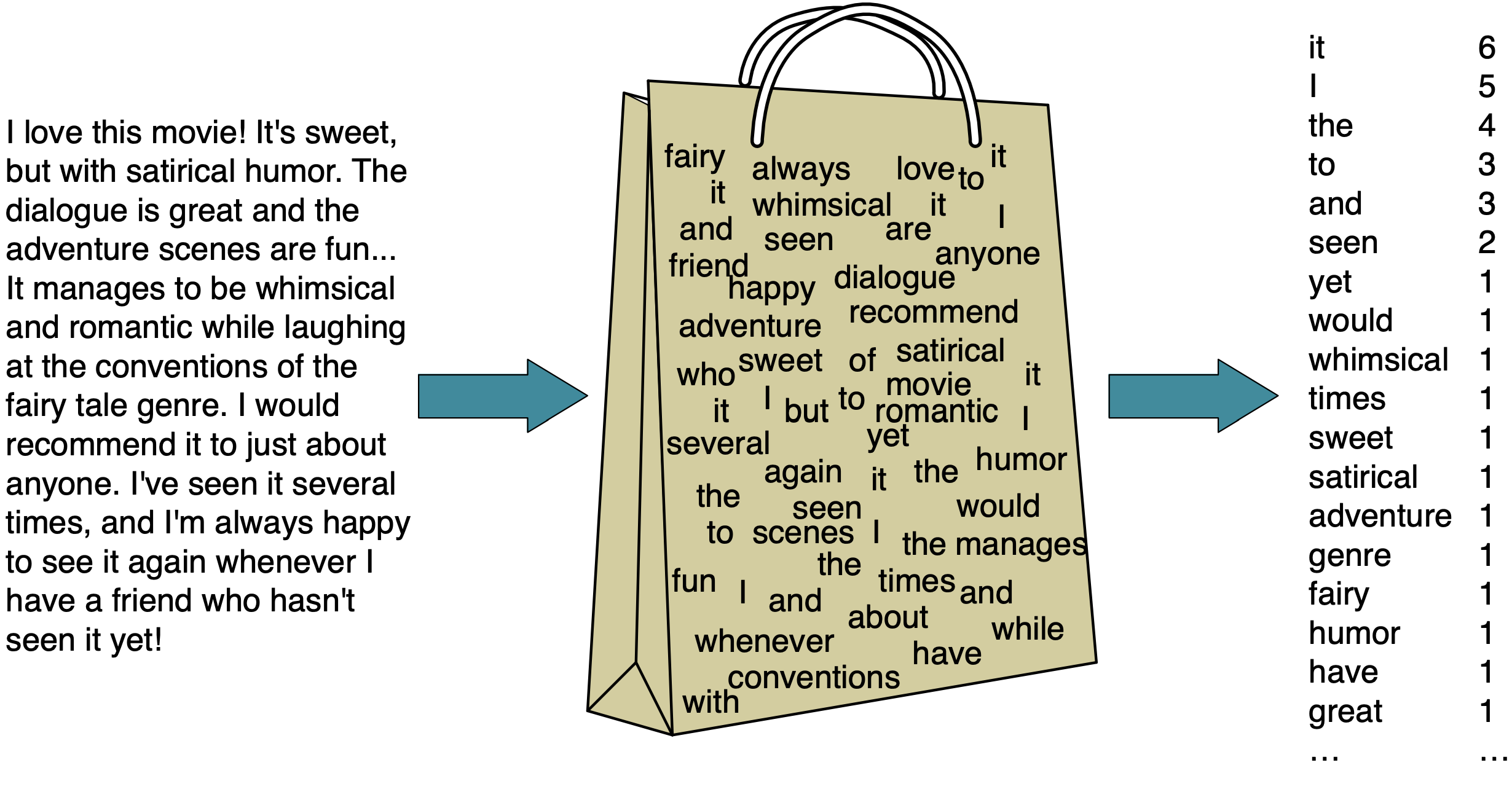
Bag of words (BOW) representation
One of the most popular representation of raw text
Ignores the syntax and word order
It has two components:
The vocabulary (all unique words in all documents)
A value indicating either the presence or absence or the count of each word in the document.
Extracting BOW features using scikit-learn
CountVectorizerConverts a collection of text documents to a matrix of word counts.
Each row represents a “document” (e.g., a text message in our example).
Each column represents a word in the vocabulary (the set of unique words) in the training data.
Each cell represents how often the word occurs in the document.
from sklearn.feature_extraction.text import CountVectorizer

vec = CountVectorizer()
X_counts = vec.fit_transform(toy_df["sms"])
bow_df = pd.DataFrame(
    X_counts.toarray(), columns=vec.get_feature_names_out(), index=toy_df["sms"]
)
bow_dftype(toy_df["sms"])pandas.core.series.SeriesX_counts<Compressed Sparse Row sparse matrix of dtype 'int64'
with 71 stored elements and shape (6, 61)>Why sparse matrices?
Most words do not appear in a given document.
We get massive computational savings if we only store the nonzero elements.
There is a bit of overhead, because we also need to store the locations:
e.g. “location (3,27): 1”.
However, if the fraction of nonzero is small, this is a huge win.
print("The total number of elements: ", np.prod(X_counts.shape))
print("The number of non-zero elements: ", X_counts.nnz)
print(
    "Proportion of non-zero elements: %0.4f" % (X_counts.nnz / np.prod(X_counts.shape))
)
print(
    "The value at cell 3,%d is: %d"
    % (vec.vocabulary_["jackpot"], X_counts[3, vec.vocabulary_["jackpot"]])
)
The total number of elements: 366
The number of non-zero elements: 71
Proportion of non-zero elements: 0.1940
The value at cell 3,27 is: 1
Question for you
What would happen if you apply
StandardScaleron sparse data?
OneHotEncoder and sparse features
By default,
OneHotEncoderalso creates sparse features.You could set
sparse=Falseto get a regularnumpyarray.If there are a huge number of categories, it may be beneficial to keep them sparse.
For smaller number of categories, it doesn’t matter much.
Important hyperparameters of CountVectorizer
binarywhether to use absence/presence feature values or counts
max_featuresonly consider top
max_featuresordered by frequency in the corpus
max_dfignore features which occur in more than
max_dfdocuments
min_dfignore features which occur in less than
min_dfdocuments
ngram_rangeconsider word sequences in the given range
Let’s look at all features, i.e., words (along with their frequencies).
First, let’s explore, CountVectorizer with default parameters.
vec = CountVectorizer()
X_counts = vec.fit_transform(toy_df["sms"])
bow_df = pd.DataFrame(
    X_counts.toarray(), columns=vec.get_feature_names_out(), index=toy_df["sms"]
)
bow_dfEach cell displays the number of times a particular word occurs in that message. For example, the word ‘urgent’ appears twice in the first message, so the count is 2.
bow_df.iloc[0]['urgent']np.int64(2)When we use binary=True, the representation uses presence/absence of words instead of word counts.
vec_binary = CountVectorizer(binary=True)
X_counts = vec_binary.fit_transform(toy_df["sms"])
bow_df = pd.DataFrame(
    X_counts.toarray(), columns=vec_binary.get_feature_names_out(), index=toy_df["sms"]
)
bow_dfNow each cell displays whether a particular word occurs in that message. For example, the word ‘urgent’ appears twice in the first message, so the representation is 1.
bow_df.iloc[0]['urgent']np.int64(1)We can control the size of X (the number of features) using max_features.
vec8 = CountVectorizer(max_features=8)
X_counts = vec8.fit_transform(toy_df["sms"])
bow_df = pd.DataFrame(
    X_counts.toarray(), columns=vec8.get_feature_names_out(), index=toy_df["sms"]
)
bow_dfvec8 = CountVectorizer(max_features=8)
X_counts = vec8.fit_transform(toy_df["sms"])
pd.DataFrame(
data=X_counts.sum(axis=0).tolist()[0],
index=vec8.get_feature_names_out(),
columns=["counts"],
).sort_values("counts", ascending=False)vec8_binary = CountVectorizer(binary=True, max_features=8)
X_counts = vec8_binary.fit_transform(toy_df["sms"])
pd.DataFrame(
data=X_counts.sum(axis=0).tolist()[0],
index=vec8_binary.get_feature_names_out(),
columns=["counts"],
).sort_values("counts", ascending=False)Preprocessing
Note that
CountVectorizeris carrying out some preprocessing by default such asConverting words to lowercase (
lowercase=True)getting rid of punctuation and special characters (
token_pattern ='(?u)\\b\\w\\w+\\b')
pipe = make_pipeline(CountVectorizer(), SVC())pipe.fit(toy_df["sms"], toy_df["target"])pipe.predict(toy_df["sms"])array(['spam', 'non spam', 'non spam', 'spam', 'spam', 'non spam'],
dtype=object)Is this a realistic representation of text data?
Of course this is not a great representation of language
We are throwing out everything we know about language and losing a lot of information.
It assumes that there is no syntax and compositional meaning in language.
But it works surprisingly well for many tasks.
We will learn more expressive representations in the coming weeks.
❓❓ Questions for you
(iClicker) Exercise 6.2
Select all of the following statements which are TRUE.
(A)
handle_unknown="ignore"would treat all unknown categories equally.(B) As you increase the value for
max_featureshyperparameter ofCountVectorizerthe training score is likely to go up.(C) Suppose you are encoding text data using
CountVectorizer. If you encounter a word in the validation or the test split that’s not available in the training data, we’ll get an error.(D) In the code below, inside
cross_validate, each fold might have slightly different number of features (columns) in the fold.
pipe = (CountVectorizer(), SVC())
cross_validate(pipe, X_train, y_train)
What did we learn today?
Motivation to use
ColumnTransformerColumnTransformersyntaxDefining transformers with multiple transformations
How to visualize transformed features in a dataframe
More on ordinal features
Different arguments
OneHotEncoderhandle_unknow="ignore"if_binary
Dealing with text features
Bag of words representation:
CountVectorizer