Week 6: Dictionaries
This week we unlocked Python’s secret weapon: the dictionary! We discovered that dictionaries aren’t just for storing data — they’re a Swiss Army knife for solving problems that would otherwise require tedious nested loops. Fast lookups, automatic grouping, instant counting — dictionaries do it all!
Your Growing Toolkit
Every problem we solve uses some combination of these tools:
- Representation — how we encode meaning (binary, types, RGB)
- Collections — how we group things (lists, tuples, dicts)
- Control flow — how we make decisions and repeat (if/else, loops)
- Functions — how we name and reuse logic
- Abstraction — how we hide complexity
- Efficiency — how we measure cost (summations, timing analysis)
This week: Dictionaries + Patterns → Powerful, efficient data manipulation!
The Big Picture
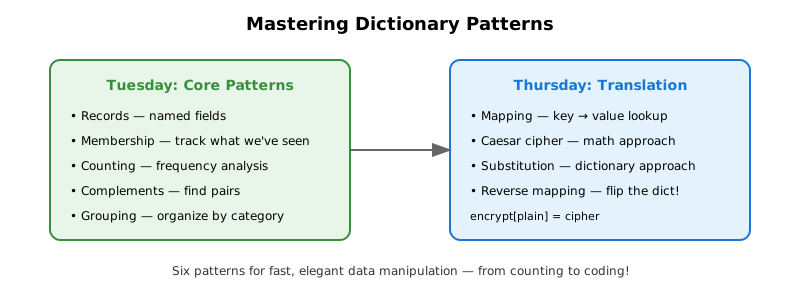
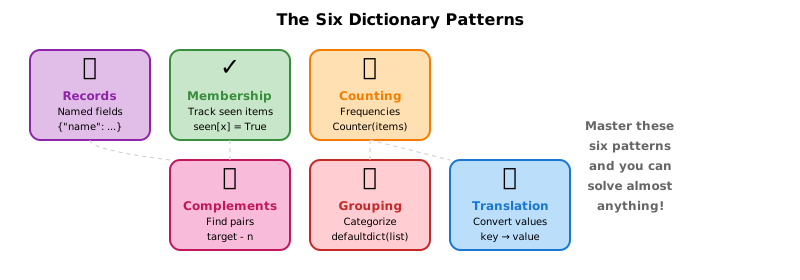
We started by discovering why dictionaries are lightning fast — constant-time lookup no matter how big they get! Then we mastered six patterns that pop up everywhere in real-world programming: records, membership, counting, complements, grouping, and translation.
Tuesday: Dictionary Fundamentals
We discovered that dictionaries give you instant lookup by key — whether you have 100 entries or 100,000!
Why Dictionaries Rock
With a list of tuples, finding an item means checking each one… painfully:
# List approach: check each item one by one 😩
fruits = [("apple", "red"), ("banana", "yellow"), ("cherry", "red")]

for fruit, color in fruits:
    if fruit == "apple":
        print(color)
        break
With a dictionary? Jump straight to the answer!
# Dictionary approach: instant lookup! 🎯
fruits = {"apple": "red", "banana": "yellow", "cherry": "red"}
print(fruits["apple"])  # BAM! Instant!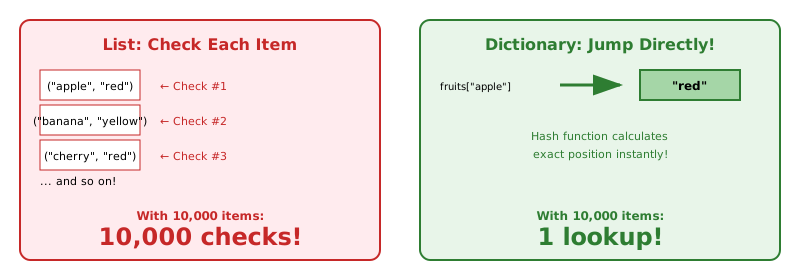
This speed difference becomes MASSIVE with thousands or millions of entries!
Watch Out: KeyError!
What happens if you look up a key that doesn’t exist?
suspect = {"name": "Prof. Histogram", "department": "Statistics"}

try:
    print(suspect["hobby"])  # BOOM! 💥
except KeyError as e:
    print(f"KeyError: {e} — that key doesn't exist!")
Two solutions:
- Check first:
if "hobby" in suspect: - Use
defaultdict: It provides a default value for missing keys — no more crashes!
Pattern 0: Records
Dictionaries work beautifully as named records — keys act as field names:
# A list of records — each dict holds one entry
security_log = [
    {"person": "Prof. Histogram", "room": "Gallery A", "time": "7:00pm"},
    {"person": "Dr. Correlation", "room": "Gallery B", "time": "7:15pm"},
    {"person": "Prof. Histogram", "room": "Gallery B", "time": "7:30pm"},
]

# Access by name, not position — so much clearer!
for log in security_log:
    print(f"{log['person']} entered {log['room']} at {log['time']}")
This is exactly how our Billboard data was structured!
Pattern 1: Membership
Use case: Track whether we’ve seen something before — lightning fast!
The Slow Way: Nested Loops
Finding people who visited both Gallery A and Gallery B:
# Check EVERY person in A against EVERY person in B 😱
in_both = []
for person_a in gallery_a_visitors:      # Loop through A
    for person_b in gallery_b_visitors:  # Loop through B
        if person_a == person_b:
            in_both.append(person_a)
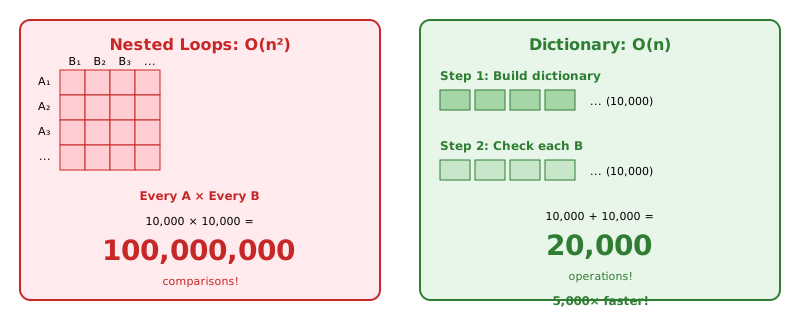
With 10,000 people in each list: 100,000,000 comparisons! That’s a recipe for a coffee break.
The Fast Way: Dictionary Lookup
from collections import defaultdict

# Step 1: Build a "seen" dictionary — one pass through A
in_gallery_a = defaultdict(bool)
for person in gallery_a_visitors:
    in_gallery_a[person] = True

# Step 2: Check Gallery B against our dictionary — one pass through B
in_both = []
for person in gallery_b_visitors:
    if in_gallery_a[person]:  # Instant lookup! No KeyError with defaultdict!
        in_both.append(person)
With 10,000 in each: just 20,000 operations! That’s 5,000x faster!
defaultdict(bool) returns False for missing keys, avoiding KeyError.
Pattern 2: Counting
Use case: Count how many times each item appears — let Python do the work!
from collections import Counter

word = "mississippi"
counts = Counter(word)

print(counts)  # Counter({'i': 4, 's': 4, 'p': 2, 'm': 1})
print(counts.most_common(2))  # [('i', 4), ('s', 4)]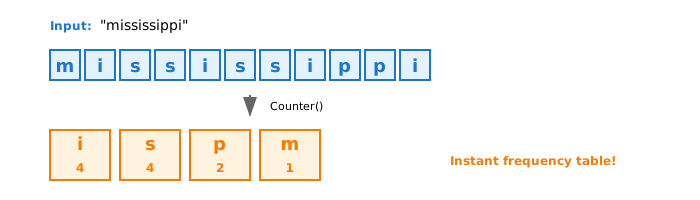
Counter is a specialized dictionary that handles counting automatically. Perfect for frequency analysis — like counting letter occurrences to crack a cipher!
Pattern 3: Complements
Use case: Find two numbers that add up to a target!
from collections import defaultdict

numbers = [3, 7, 1, 9, 4, 6, 2]
target = 10

seen = defaultdict(bool)
for n in numbers:
    complement = target - n
    if seen[complement]:
        print(f"Found pair: {complement} + {n} = {target}")
    seen[n] = True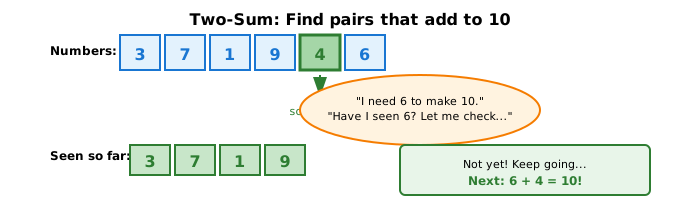
As we scan through, we remember what we’ve seen — and instantly check if the complement exists. This is the famous “two-sum” pattern!
Pattern 4: Grouping
Use case: Organize items into categories — like pandas groupby, but from scratch!
from collections import defaultdict

fruits = [
    ("apple", "red"),
    ("banana", "yellow"),
    ("cherry", "red"),
    ("lemon", "yellow"),
]

by_color = defaultdict(list)
for fruit, color in fruits:
    by_color[color].append(fruit)

print(dict(by_color))
# {'red': ['apple', 'cherry'], 'yellow': ['banana', 'lemon']}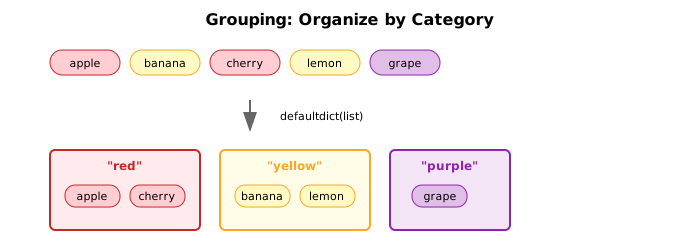
defaultdict(list) automatically creates an empty list for missing keys — no more checking before appending!
Grouping Records
When your items are dictionaries, same pattern — just grab the key you want to group by:
suspects = [
    {"name": "Prof. Histogram", "alibi": "faculty meeting"},
    {"name": "Mr. Regression", "alibi": "faculty meeting"},
    {"name": "Ms. Outlier", "alibi": "working late"},
]

by_alibi = defaultdict(list)
for suspect in suspects:
    by_alibi[suspect["alibi"]].append(suspect["name"])

# {'faculty meeting': ['Prof. Histogram', 'Mr. Regression'], 'working late': ['Ms. Outlier']}
Thursday: Translation Pattern
We added one more powerful pattern: using dictionaries as lookup tables to translate between representations!
Pattern 5: Translation
Use case: Convert values from one representation to another — instantly!
from collections import defaultdict

word_to_emoji = defaultdict(str, {
    "sun": "☀️", "rain": "🌧️", "cloud": "☁️",
    "happy": "😊", "sad": "😢", "love": "❤️",
    "cat": "🐱", "dog": "🐶", "coffee": "☕"
})

words = ["I", "love", "coffee"]
result = []
for w in words:
    emoji = word_to_emoji[w.lower()]
    result.append(emoji if emoji else w)

print(" ".join(result))  # I ❤️ ☕
The dictionary is the translation table — no formulas, just instant lookup!
Caesar vs. Random Substitution
For a simple Caesar cipher (shift by a fixed amount), we can use math:
def decode_caesar(text, shift):
    result = ""
    for char in text:
        if char.isalpha():
            position = ord(char) - ord('A')
            new_position = (position - shift) % 26
            result += chr(new_position + ord('A'))
        else:
            result += char
    return result

print(decode_caesar("WKLV LV WKH FRGH", 3))  # "THIS IS THE CODE"
But what about a random substitution cipher? No formula can help — we need a mapping dictionary!
# The decryption key: cipher letter → plain letter
decrypt = {
    "X": "A", "W": "B", "E": "C", "R": "D", "Z": "E",
    "Y": "F", "M": "G", "Q": "H", "P": "I", "J": "J",
    "K": "K", "S": "L", "D": "M", "F": "N", "G": "O",
    "H": "P", "B": "Q", "L": "R", "V": "S", "T": "T",
    "U": "U", "C": "V", "N": "W", "A": "X", "O": "Y", "I": "Z"
}

secret_message = "QXCZ X MLZXT LZXRPFM WLZXK"

decoded = ""
for char in secret_message:
    if char.isalpha():
        decoded += decrypt[char]
    else:
        decoded += char

print(decoded)  # "HAVE A GREAT READING BREAK"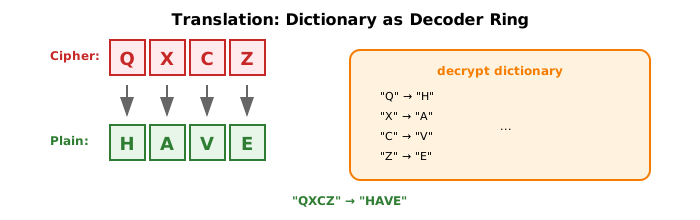
Building the Reverse Mapping
If you have a decrypt dictionary (cipher → plain), you can build an encrypt dictionary (plain → cipher) by flipping it:
# Given: decrypt maps cipher → plain
# Build: encrypt maps plain → cipher

encrypt = {}
for cipher_letter, plain_letter in decrypt.items():
    encrypt[plain_letter] = cipher_letter

# Now we can encode our own messages!
message = "HELLO"
encoded = ""
for char in message:
    if char.isalpha():
        encoded += encrypt[char]
    else:
        encoded += char
Two-way translation tables — dictionaries make it effortless!
The Six Dictionary Patterns
| Pattern | Use Case | Technique |
|---|---|---|
| Record | Store named fields | {"name": ..., "age": ...} |
| Membership | Track what we’ve seen | defaultdict(bool), seen[x] = True |
| Counting | Count occurrences | Counter(items) |
| Complement | Find matching pairs | Store & check complements |
| Grouping | Organize by category | defaultdict(list) |
| Translation | Convert representations | Direct key → value mapping |
Putting It All Together: The Great Data Heist
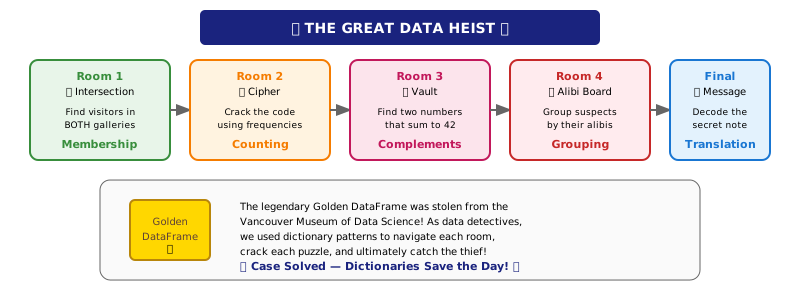
Throughout this week, we told the story of The Great Data Heist — a mystery at the Vancouver Museum of Data Science where the legendary Golden DataFrame was stolen!
As data detectives, we used dictionary patterns to:
- Room 1 (Membership): Find suspects who visited BOTH Gallery A and Gallery B by building a “seen” dictionary
- Room 2 (Counting): Crack a cipher by analyzing letter frequencies with
Counter - Room 3 (Complements): Open the vault by finding two numbers that sum to the target
- Room 4 (Grouping): Find the lone wolf suspect by grouping alibis with
defaultdict(list) - Final Challenge (Translation): Decode the thief’s message using a substitution cipher mapping
Each room taught us a pattern that solves real problems efficiently. The escape room was fun, but the patterns are tools you’ll use again and again!
Quick Reference
Creating Dictionaries
| Task | Code |
|---|---|
| Empty dictionary | d = {} |
| With initial values | d = {"a": 1, "b": 2} |
| Default for missing keys | d = defaultdict(bool) |
| Default empty list | d = defaultdict(list) |
| Counter | c = Counter(items) |
Dictionary Operations
| Task | Code |
|---|---|
| Get value | d[key] or d.get(key, default) |
| Set value | d[key] = value |
| Check if key exists | if key in d: |
| Get all keys | d.keys() |
| Get all values | d.values() |
| Get key-value pairs | d.items() |
Looping Over Dictionaries
# Loop over keys
for key in d:
    print(key)

# Loop over values
for value in d.values():
    print(value)

# Loop over both
for key, value in d.items():
    print(f"{key}: {value}")
defaultdict Types
| Default Factory | Missing Key Returns | Use Case |
|---|---|---|
defaultdict(bool) |
False |
Membership tracking |
defaultdict(int) |
0 |
Counting |
defaultdict(list) |
[] |
Grouping |
defaultdict(str) |
"" |
Translation |
What’s Next?
Reading Week — No Classes!
Enjoy the break! When we return in Week 8, we’ll keep building on these foundations as you work toward Project 1.
Have a great reading break!