Programming, problem solving, and algorithms
CPSC 203, 2026 W1
October 1, 2026
Announcements
- You must sit Examlet 1 in ORCA between today and Monday.
- POTWs
Where Are We?
What have we covered so far in CPSC 203?
- Complexity.
- How does the amount of work grow as the size of the problem grows?
- Data representation.
- Computers represent everything as binary integers.
- We can map other types of data to numbers: characters, colours, etc.
- Arbitrary sized data: Lists and tuples.
- Compound data: Dataclasses.
Today
- Tabular data:
dataframesand thepandaslibrary - Dates and times:
datetimelibrary
Pandas and Data Frames
Tabular Data
We often encounter data in tabular form.
Consider the Billboard Hot 100.
The data from the week of January 31, 2026:
| date | title | artist | rank | peakPos | lastPos | isNew | weeks |
|---|---|---|---|---|---|---|---|
| 2026-01-31 | I Just Might | Bruno Mars | 1 | 1 | 1 | False | 2 |
| 2026-01-31 | Man I Need | Olivia Dean | 2 | 2 | 4 | False | 22 |
| 2026-01-31 | The Fate Of Ophelia | Taylor Swift | 3 | 1 | 2 | False | 16 |
| 2026-01-31 | Golden | HUNTR/X: EJAE, Audrey Nuna & REI AMI | 4 | 1 | 3 | False | 31 |
| 2026-01-31 | Ordinary | Alex Warren | 5 | 1 | 5 | False | 49 |
CSV Format
Acronym for comma separated values
- Each line is one row of the table.
- Each column contains the information between commas.
- Strings containing spaces or unusual symbols (such as commas) may be surrounded by double quotes.
- Use extension
.csvfor files with this formatting.
date,title,artist,rank,peakPos,lastPos,isNew,weeks
2026-01-31,I Just Might,Bruno Mars,1,1,1,False,2
2026-01-31,Man I Need,Olivia Dean,2,2,4,False,22
2026-01-31,The Fate Of Ophelia,Taylor Swift,3,1,2,False,16
2026-01-31,Golden,"HUNTR/X: EJAE, Audrey Nuna & REI AMI",4,1,3,False,31
2026-01-31,Ordinary,Alex Warren,5,1,5,False,49Processing Tabular Data in CPSC 103
Typical CPSC 103 workflow for CSV files:
- Identify or create a data type for the information in each column of interest.
- Create Compound data type to store a row.
- Create List[Compound] data type to store the full data set.
- Write read and parse functions to get the data from the file.
- Write analyze and visualize functions to process the data and produce output.
CPSC 103 Approach Example
Create a compound for each row of the Hot 100:
Create a list[Song] to store the table.
CPSC 103 Queries
Answering a query about the data in the table requires loop(s).
For example: What is the name of the artist of the song which has been on the chart for the most weeks?
CPSC 103 Approach: Pros and Cons
- Pro: You think carefully about the information and the data representation before coding.
- Pro: You practice your HtDD and HtDF processes and get correct implementations.
- Con: Your code is very specific to a single data set.
- Con: You can easily manipulate rows, but not columns.
- Con: New functions and loops are required for even simple filter or map operations.
- Con: Your code is not particularly efficient.
Alternative: List of Dictionaries
- Each row is represented as a dictionary.
- The keys of the dictionary are the column names.
- The table is a list of dictionaries.
A Better Way: DataFrames
A DataFrame is a 2D table: rows = records, columns = attributes.
DataFrames have built-in operations for filtering, aggregating, and more.
.csv files for Pandas
If our data is in a .csv file:
.csv files must have attribute names in row 1, and data beginning in row 2.
The Payoff: One-Liners!
| Task | With loops | With DataFrames |
|---|---|---|
| Count new songs | 5+ lines | df[df['isNew']].shape[0] |
| Average peak | 4 lines | df['peakPos'].mean() |
| Filter long-running | 4 lines | df[df['weeks'] > 10] |
| Find biggest mover | 8+ lines | df.loc[df['gradient'].abs().idxmax()] |
Selecting rows
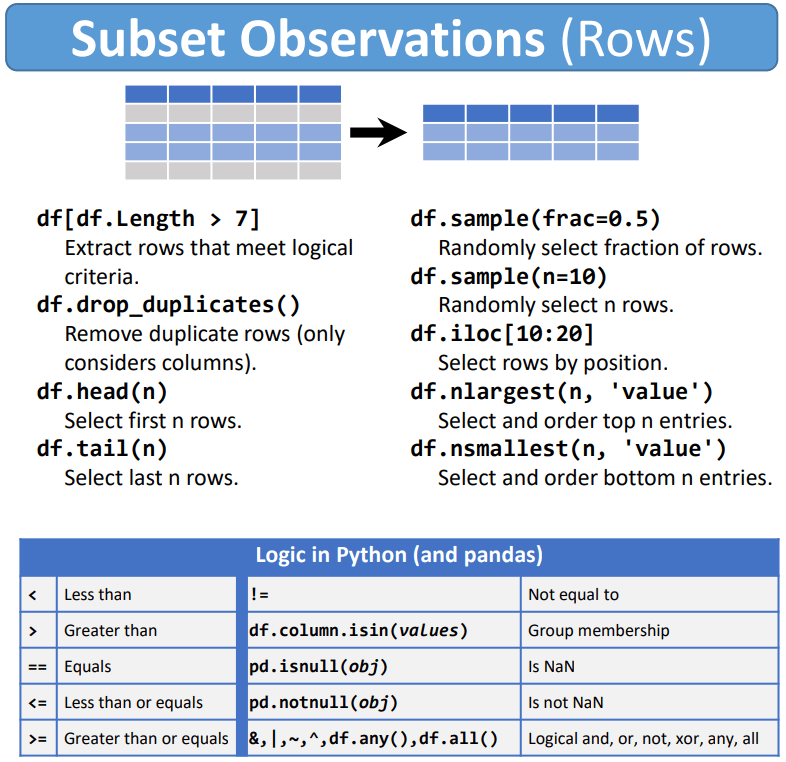
df[df[col] > val]— filter by condition
df.nlargest(n, col)— top n by column
Adding a column
df['new_col'] = expressionAdds a column to the DataFrame containing the computed value for every row.
df[df['new_col'] > val]Filter rows by the new column.
Demo 1: Counting with a condition
Demo: How many Taylor Swift songs?
Goal: Count songs by a specific artist.
Strategy:
- Filter rows where artist contains “Taylor”
- Count the resulting rows
Demo: How many songs at #1 peak?
Goal: Count songs that peaked at #1.
Strategy:
- Filter where
peakPos == 1 - Count with
len()or.shape[0]
Demo 2: Aggregation (mean, max, min)
Demo: Average weeks on chart
Goal: Find the average weeks on chart.
Strategy:
- Select a column:
df['weeks'] - Apply aggregation:
.mean()
Demo: Average weeks for top 10 only
Goal: Average weeks, but only for top 10 songs.
Strategy:
- Filter first:
df[df['rank'] <= 10] - Then aggregate:
['weeks'].mean()
Demo 3: Finding extremes with idxmax
Demo: Longest-running song
Goal: Find the song with the most weeks on chart.
Strategy:
idxmax()returns the row index of the maximumdf.loc[idx]retrieves that row
Demo: Biggest riser this week
Goal: Which song moved up the most?
Problem: New songs have lastPos = 0 (they weren’t on the chart last week).
Strategy:
- Filter out new songs first
- Compute change:
lastPos - rank - Find max with
idxmax()
Handling special values
The lastPos = 0 problem
New songs weren’t on the chart last week, so lastPos = 0.
If we compute change = lastPos - rank:
- New song at #23:
0 - 23 = -23 - Looks like it fell 23 spots!
Solution: Filter them out first.
Let’s Write Code
Open CA5.1 Billboard, and load STUDENT_nb.py.
Pandas and Dataframes: A Sharp Blade
Compared to the CPSC 103 process, Pandas:
- Allows us to quickly† perform complex data manipulations.
- Allows us to quickly† generate bugs that are difficult to spot and even harder to remove.
Dates and Times
Warm Up
datetime: a Python library that simplifies date computation.
Objects we need
date— a calendar day (year-month-day)timedelta— a number of days you can add/subtract
Core calls
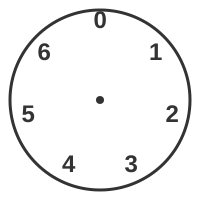
today=date.today(): today’s datetoday.weekday(): an integer 0..6 with Mon=0, … , Sun=6today - timedelta(days=k): the date k days earlier
Last Saturday
Let \(w =\) today.weekday() \(\in \{0,\dots,6\}\) and note Saturday \(= 5\).
offset: How many days to step back to reach Saturday.
- If today is Saturday (\(w=5\)): offset \(=0\)
- If today is Sunday (\(w=6\)): offset \(=1\)
- If today is Monday (\(w=0\)): offset \(=2\)
\[ \texttt{offset} = (w - 5)\bmod 7 \]
\[ \texttt{lastSaturday} = \texttt{today} - \texttt{timedelta(days=offset)}. \]
Code
Resources
https://pymotw.com/2/datetime/
https://www.dataschool.io/best-python-pandas-resources/
https://pandas.pydata.org/Pandas_Cheat_Sheet.pdf
https://queirozf.com/entries/pandas-dataframe-plot-examples-with-matplotlib-pyplot